looney.eu
INFRASTRUCTURE / AUTOMATION / DEVELOPMENT
Fixing things that don't need fixing and breaking things that didn't need breaking.
I script workflows, deploy infrastructure, preach vim over nano, get unreasonably excited about open source tools and appreciate topping all that off with well-spent game time among friends.
Use keyboard to navigate → ↑ ↓ · press ~ for the prompt, try "help"
GET IN TOUCH
INFO

Infrastructure
Projects
A 12U rack of macOS, Linux and Proxmox hosts behind a Cisco core switch, with a VPS and a storage box alongside over Tailscale. Runs media, communications, game servers, local models, file sync, home automation, a doorbell recorder, a malware sandbox, network monitoring, fleet-wide security scanning with Wazuh and an Active Directory lab.
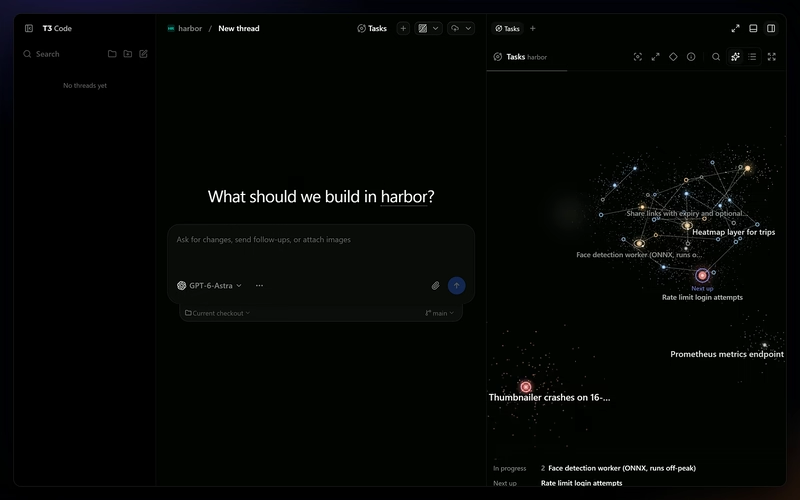
A build of T3 Code, the desktop GUI for Codex, Claude and other coding agents, that tracks the stable channel and adds a Tasks panel backed by Segments. Every task is a star in a galaxy you can fly through, coloured by priority and clustered by what blocks it, and Implement hands any task to an agent as the brief for a new thread.
features
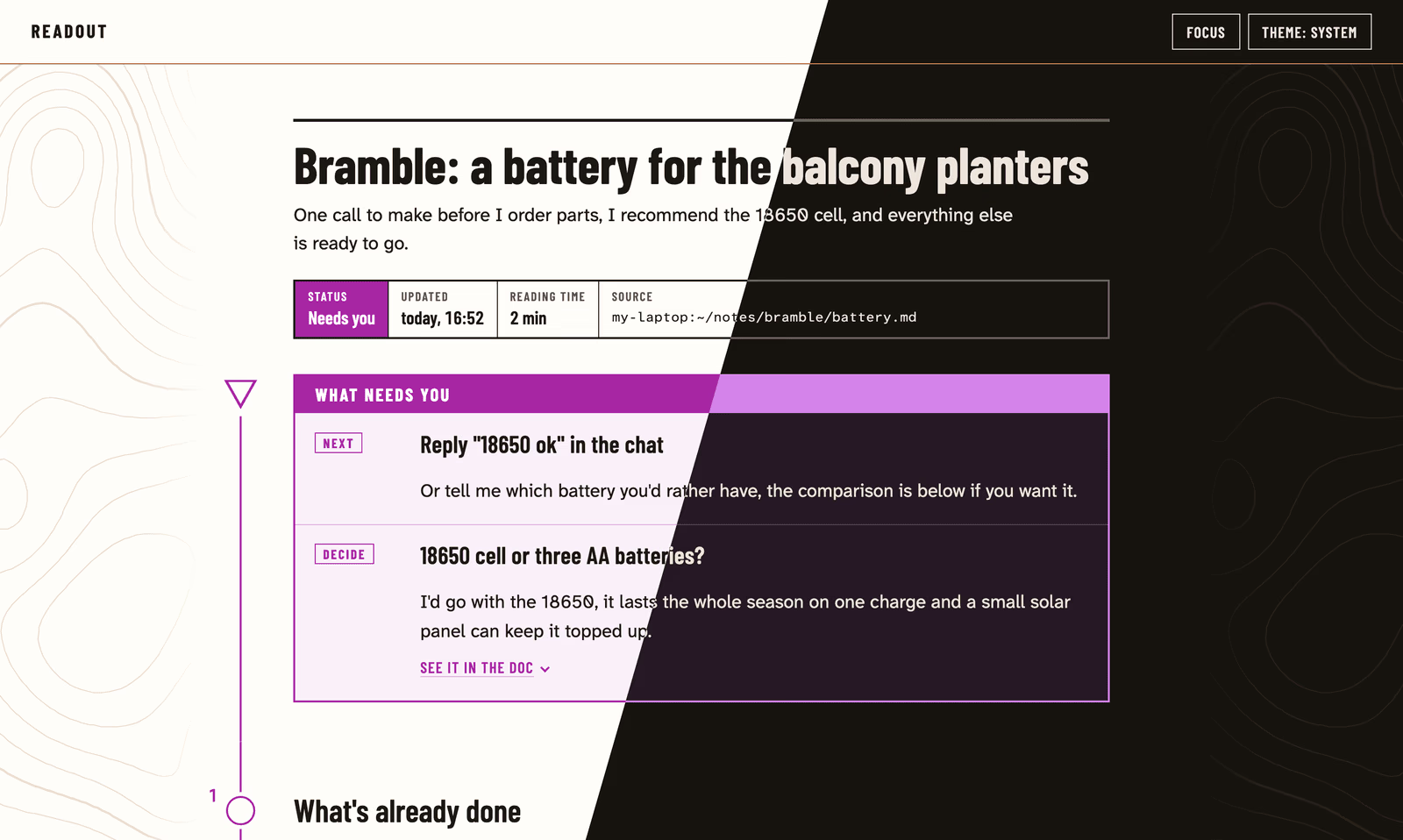
A small tailnet server that turns the markdown AI agents write into calm, readable pages, built for readers with ADHD or autism and for anyone who finds raw markdown tiring. An agent publishes a file with one command and hands over the link, and the page pins every next step and decision waiting on the reader into a box at the top, then keeps itself up to date while the agent goes on editing the file.
features
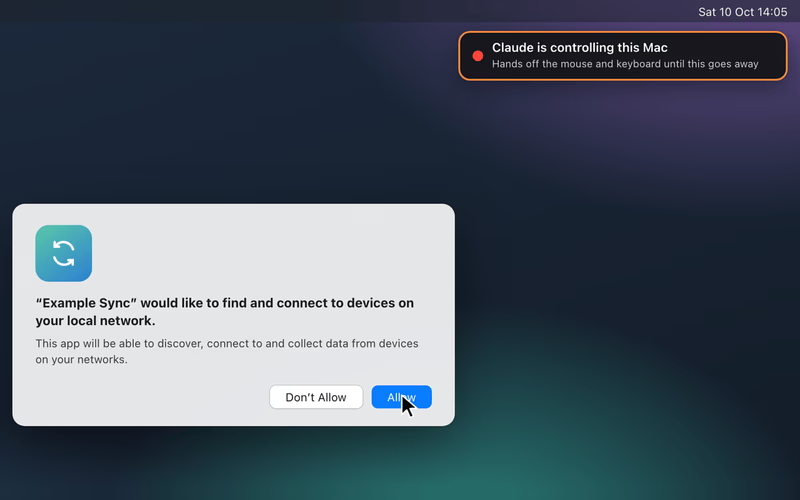
An MCP server and a desktopctl command that give Claude Code, Codex or any MCP client its own screen view, mouse and keyboard on the logged-in desktops of Macs, Linux boxes and Windows PCs. It handles the GUI-only steps an agent would otherwise hand back to you, like macOS privacy prompts, lock screens, installers and Windows dialogs, with passwords referred to by name and every screen action in an audit log.
features
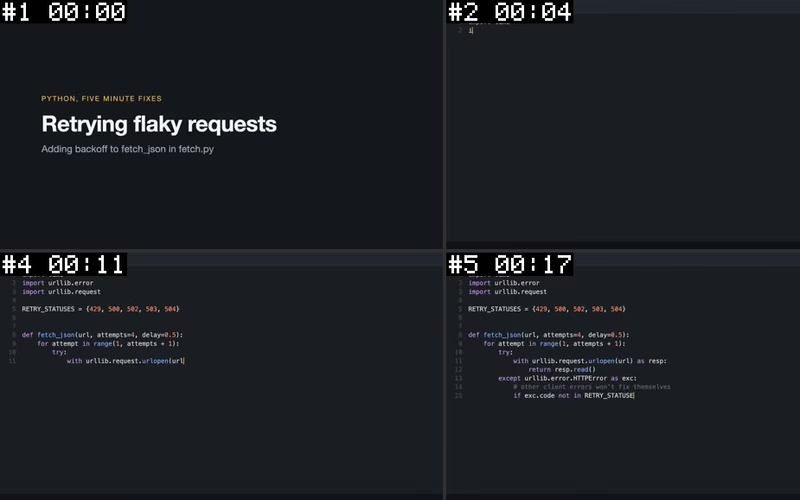
An Agent Skill that lets Claude Code, Codex or any agent that reads SKILL.md files watch a video, as a heavily extended fork of bradautomates/claude-video. Give it a URL or a file and it picks frames at scene cuts and regular intervals, reads the on-screen text with OCR and takes the transcript from captions or a local Whisper model, so the agent answers from timestamped contact sheets, text and transcript.
features
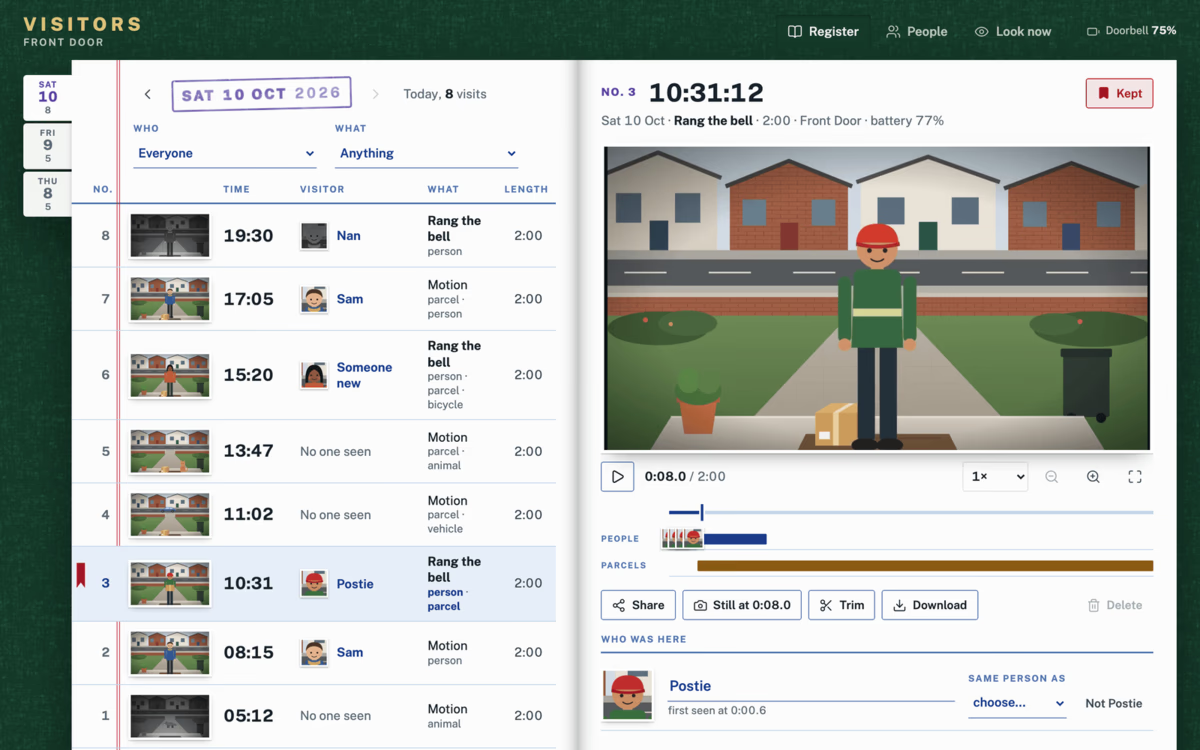
A self-hosted visitors' book for a Ring doorbell without a Ring Protect plan, where Ring keeps no recordings of its own. It records a clip on every motion or ring, picks out people, vehicles, parcels and animals, and optionally who by face, then files each visit in a web app laid out like a signing-in register, with a player, a people index, a live view, trims, stills and sharing.
features
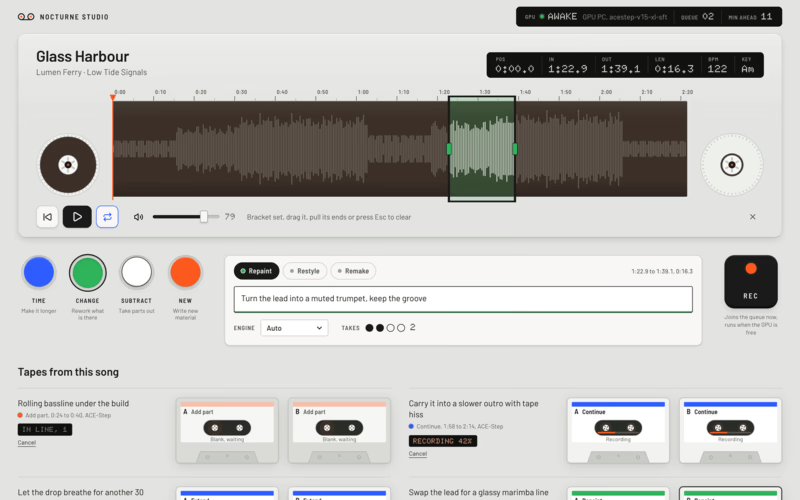
A self-hosted AI music studio for songs you already have, where you bracket part of a waveform and press a colour key to extend, repaint, restyle or split it, or write a new song from a prompt. A small hub holds the queue and serves the app, and a GPU worker on a Windows PC pulls jobs whenever it is awake and free, so you can queue ideas from your phone while the PC is off or busy with a game.
features
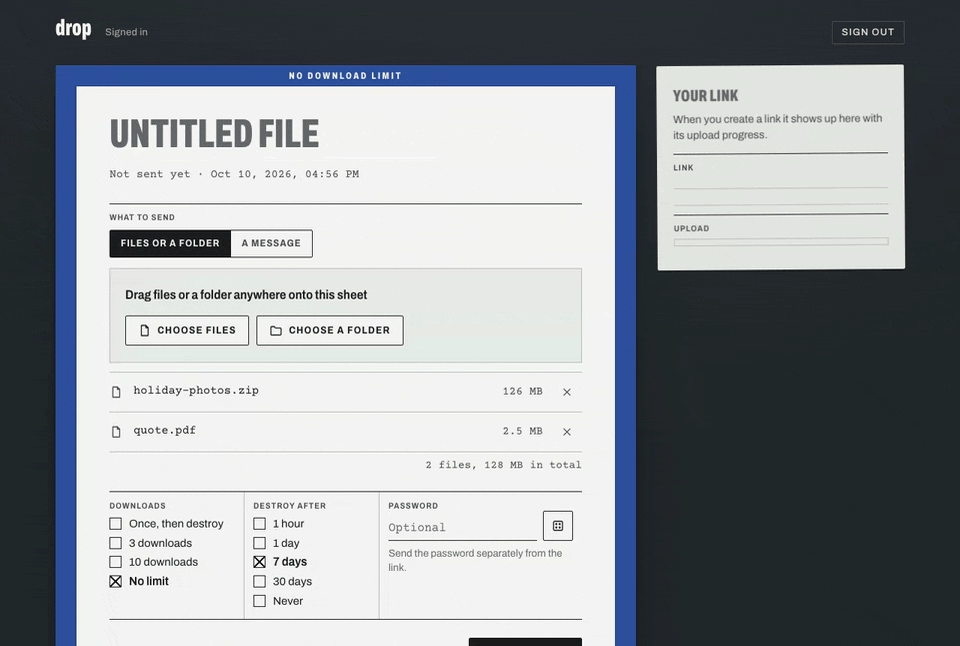
A self-hosted, end-to-end encrypted way to send files, folders and messages, where the link works the moment you create it and a friend's download keeps pace with your upload. Everything is encrypted in the browser with the key riding in the link, so the server only ever holds ciphertext, and it enforces the burn after a set number of downloads, at expiry or when either side destroys the drop.
features
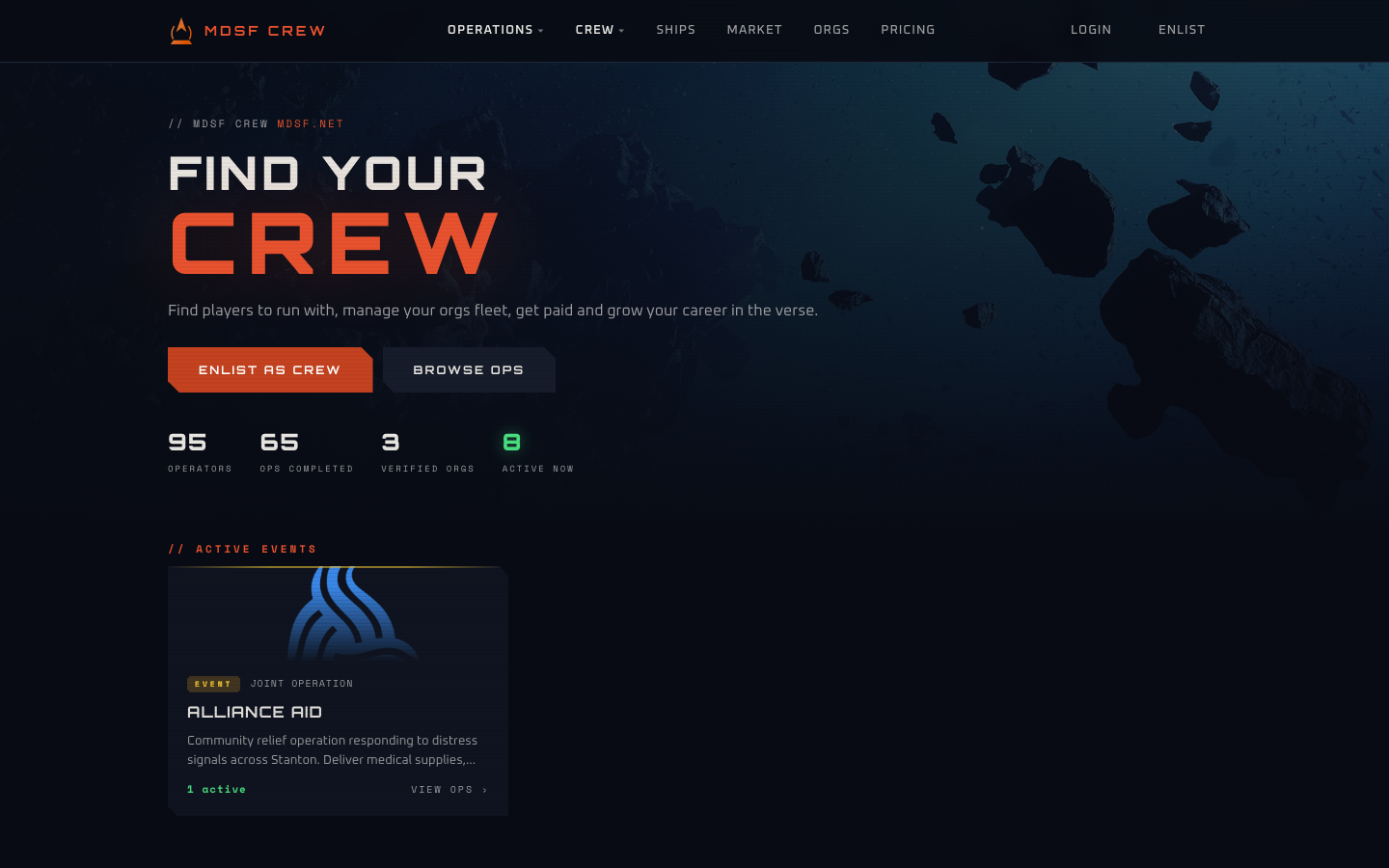
Crew-for-hire platform for Star Citizen. Recruiters post operations and assemble crews. Crew members list availability and build reputation through review-based rankings. Organisations manage squads, ranks, and fleets -- all tied to RSI-verified identities.
features
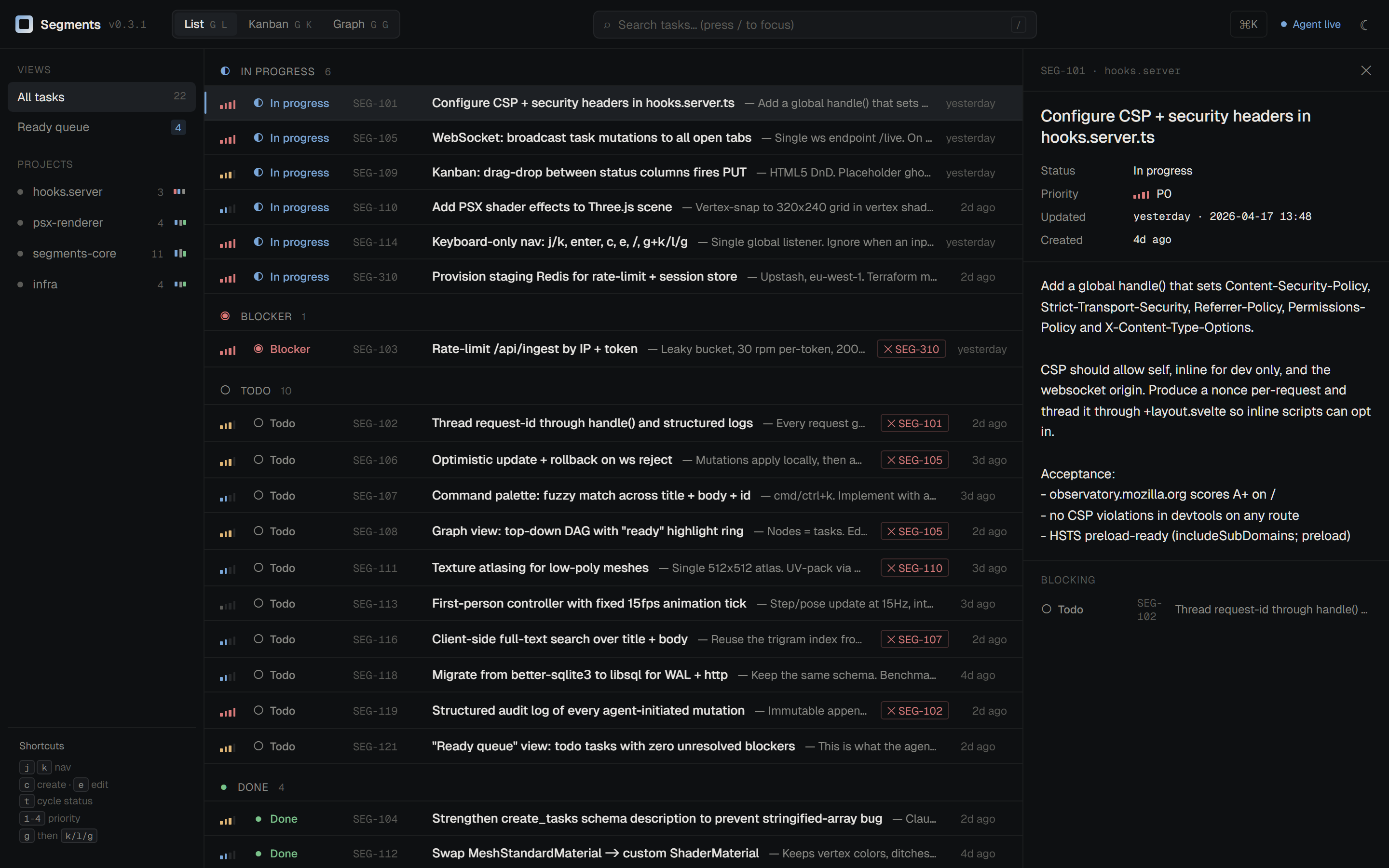
Single-binary task and project manager built as a faster replacement for Beads. It combines an LMDB-backed CLI, live web UI, and MCP tools for agent-friendly planning across projects.
CLI that answers "why is my shell doing this?" — inspects a shell session, applies per-shell startup-file rules, safely parses source statements, detects tooling hooks (starship, direnv, nvm, ...), and labels every file with a confidence level instead of pretending static analysis can prove runtime behavior.

C++ library that indexes a local music collection and resolves cover art by track metadata. Scans directories on startup, watches for changes, and returns matching cover art fast enough for real-time use in discord-music-presence.




BLOG
↑↓ pick a post · ↵ read · inside a post: j/k scroll, n next, q back
What/who is Crestron?
Blessed are those who need not utter its name, horrified are those who must deal with its pain. Crestron is a manufacturer of control automation equipment mostly used in commercial settings, auditoriums, education, healthcare, etc.
They are a name unknown to most who do not work in the sector, yet they own essentially the entire market of AV automation, the process of “push this button, turn that screen on, push another button, change its input to x” all of that done through proprietary deals with almost all equipment manufacturers, think LG, think Sony, Samsung, etc if you know a brand of TVs, projectors or lighting used in commercial spaces, there’s a good chance Crestron has an agreement to build their protocols into the device.
What does Crestron do?
As touched on above, it allows audio visual automations and control that would otherwise be quite difficult, think a big display on a wall with a single HDMI cord, ethernet cord and a kettle plug. If you wanted to say plug your laptop into that display, you’d have to awkwardly unplug the end of the HDMI going into the old device and plug it into your laptop, that works, but also causes a cable nightmare, people ripping cables out of cable socks, trunking, etc. Instead, we want a way to plug your laptop into a laptop cable, hit a button on a little panel and boom, your laptop is now the main input for the display.
That’s where Crestron comes in, it allows you to have an ecosystem where your display is routed to a HDMI switcher (made by Crestron) which then has several inputs, all of which can be cycled between remotely, or manually.
You would then grab a controller of some kind (likely a Crestron controller) which can be programmed with all sorts of application routing for that HDMI switcher, allowing you to change the input on the switcher based on a button/touchpad press.
But it doesn’t stop there, remember I said how well integrated Crestron are with brands? you can also program logic on the devices themselves most of the time, allowing you to control power, volume, mute/unmute, brightness and a whole bunch of other display settings right from the controller. Atop of that, it allows scripting to a major extent allowing remote monitoring, calling back to logging servers, etc so that IT teams are kept in the loop about AV equipment functioning as normal.
So, what is there not to love?
Well, as it tends to go, any single time in humanity’s history where a single company has that much ownership of any specific market, you tend to get a lot of laziness on the part of that company to improve their products or do anything more than sit upon their cash cow and reap the rewards of their domination.
As it turns out, Crestron is a market leader, and because of this they sadly do not encourage the best of product direction or support.
I’ll touch on a few feedback points but I’m sure there’s more as I’m only starting my journey with Crestron equipment.
Lack of documentation
One of the most infuriating components of this company, for how well-integrated they are with vendors, they seem to lack documenting their own products, just recently I had an issue where one of our switchers needed to be logged into for configuration, the password was forgotten, I thought “fine, I’ll just go reset it” and I find no reset button whatsoever on the device, I then check the docs, no documented way to reset the product and most other products in the family had differing ways, but they mainly centred around the “setup” button on the front of the device.
So I spent a good 15 minutes refusing to believe a device with physical access cannot be reset and didn’t want to give up and call Crestron for help, so I sat with it and eventually found the answer, something that could’ve taken 30 seconds to document on the product page or manual now wasted over 15 minutes of my time trying different combinations to find the right one.
While I can’t give the exact model of the device I’m referring to, I will say that if ever you find yourself in a similar situation with a POE Crestron switcher, I’ve documented the steps I took to reset it:
- Pull the power (ethernet)
- Hold the setup button.
- Plug the ethernet/power back in and hold that setup button for about 15 seconds.
- The setup LED should flash rapidly to signify that a reset has taken place.
This documentation issue stems beyond just switchers, the amount of products and ways to interact with products & vendors they have, there’s so many gaps in that documentation that you just need to figure out through trial and error.
Very poor software experiences
I’ve seen a lot of bad UX & UI in my time, working with Microsoft products, that’s a given. But Crestron takes it to a whole new level, you have CURSED workflows in this thing, UI design from the 90s that never once saw a facelift, when it comes to the software used to program & maintain Crestron devices, they provide you with the bare minimum in functional software that is archaic by today’s standards.
I would invite you to look at the docs on how to use SIMPL by Crestron, the app used to program many of their devices, notice how the screenshots and documentation is showcasing Windows XP era graphics, that’s because that was the last time it ever had its UI touched.
I understand the term of “if it ain’t broke, don’t fix it” but there comes a point where your software falls behind modern standards by a non-zero magnitude where it should be your moral obligation to update it.
But as stated, this is what happens when you dominate the market.
So is there anything good about working with Crestron?
The build quality
The hardware for the most part is fairly reliable, it is unlikely to falter even in a rough environment, or at least that I’ve seen, they are well built pieces of kit intended to last a good decade long enterprise life cycle.
Once it is set, you can truly forget
Although it is a pain to make the initial program, debug issues and flash it, once it’s done you will never need to touch it again bar the odd firmware update on the hardware themselves, which can be done very easily over the network.
They are certainly set & forget devices intended to remain reliable and functional for their entire already well mentioned life cycles.
A summary of Crestron
Crestron as far as companies go that could easily gouge a bit more, make the product even worse or god knows what else, they’re enough of a market leader that they could pull that, but they don’t, they remain stagnant on the software side of things for sure and they need more people writing documentation, but the products aren’t all bad and they do their job very reliably.
I can say that there’s far worse software made by even Microsoft for the current day in comparison, so things could be worse, but they certainly could also be better.
Links/references
- External: Crestron wiki
What/who is Crestron?
Blessed are those who need not utter its name, horrified are those who must deal with its pain. Crestron is a manufacturer of control automation equipment mostly used in commercial settings, auditoriums, education, healthcare, etc.
They are a name unknown to most who do not work in the sector, yet they own essentially the entire market of AV automation, the process of “push this button, turn that screen on, push another button, change its input to x” all of that done through proprietary deals with almost all equipment manufacturers, think LG, think Sony, Samsung, etc if you know a brand of TVs, projectors or lighting used in commercial spaces, there’s a good chance Crestron has an agreement to build their protocols into the device.
What does Crestron do?
As touched on above, it allows audio visual automations and control that would otherwise be quite difficult, think a big display on a wall with a single HDMI cord, ethernet cord and a kettle plug. If you wanted to say plug your laptop into that display, you’d have to awkwardly unplug the end of the HDMI going into the old device and plug it into your laptop, that works, but also causes a cable nightmare, people ripping cables out of cable socks, trunking, etc. Instead, we want a way to plug your laptop into a laptop cable, hit a button on a little panel and boom, your laptop is now the main input for the display.
That’s where Crestron comes in, it allows you to have an ecosystem where your display is routed to a HDMI switcher (made by Crestron) which then has several inputs, all of which can be cycled between remotely, or manually.
You would then grab a controller of some kind (likely a Crestron controller) which can be programmed with all sorts of application routing for that HDMI switcher, allowing you to change the input on the switcher based on a button/touchpad press.
But it doesn’t stop there, remember I said how well integrated Crestron are with brands? you can also program logic on the devices themselves most of the time, allowing you to control power, volume, mute/unmute, brightness and a whole bunch of other display settings right from the controller. Atop of that, it allows scripting to a major extent allowing remote monitoring, calling back to logging servers, etc so that IT teams are kept in the loop about AV equipment functioning as normal.
So, what is there not to love?
Well, as it tends to go, any single time in humanity’s history where a single company has that much ownership of any specific market, you tend to get a lot of laziness on the part of that company to improve their products or do anything more than sit upon their cash cow and reap the rewards of their domination.
As it turns out, Crestron is a market leader, and because of this they sadly do not encourage the best of product direction or support.
I’ll touch on a few feedback points but I’m sure there’s more as I’m only starting my journey with Crestron equipment.
Lack of documentation
One of the most infuriating components of this company, for how well-integrated they are with vendors, they seem to lack documenting their own products, just recently I had an issue where one of our switchers needed to be logged into for configuration, the password was forgotten, I thought “fine, I’ll just go reset it” and I find no reset button whatsoever on the device, I then check the docs, no documented way to reset the product and most other products in the family had differing ways, but they mainly centred around the “setup” button on the front of the device.
So I spent a good 15 minutes refusing to believe a device with physical access cannot be reset and didn’t want to give up and call Crestron for help, so I sat with it and eventually found the answer, something that could’ve taken 30 seconds to document on the product page or manual now wasted over 15 minutes of my time trying different combinations to find the right one.
While I can’t give the exact model of the device I’m referring to, I will say that if ever you find yourself in a similar situation with a POE Crestron switcher, I’ve documented the steps I took to reset it:
- Pull the power (ethernet)
- Hold the setup button.
- Plug the ethernet/power back in and hold that setup button for about 15 seconds.
- The setup LED should flash rapidly to signify that a reset has taken place.
This documentation issue stems beyond just switchers, the amount of products and ways to interact with products & vendors they have, there’s so many gaps in that documentation that you just need to figure out through trial and error.
Very poor software experiences
I’ve seen a lot of bad UX & UI in my time, working with Microsoft products, that’s a given. But Crestron takes it to a whole new level, you have CURSED workflows in this thing, UI design from the 90s that never once saw a facelift, when it comes to the software used to program & maintain Crestron devices, they provide you with the bare minimum in functional software that is archaic by today’s standards.
I would invite you to look at the docs on how to use SIMPL by Crestron, the app used to program many of their devices, notice how the screenshots and documentation is showcasing Windows XP era graphics, that’s because that was the last time it ever had its UI touched.
I understand the term of “if it ain’t broke, don’t fix it” but there comes a point where your software falls behind modern standards by a non-zero magnitude where it should be your moral obligation to update it.
But as stated, this is what happens when you dominate the market.
So is there anything good about working with Crestron?
The build quality
The hardware for the most part is fairly reliable, it is unlikely to falter even in a rough environment, or at least that I’ve seen, they are well built pieces of kit intended to last a good decade long enterprise life cycle.
Once it is set, you can truly forget
Although it is a pain to make the initial program, debug issues and flash it, once it’s done you will never need to touch it again bar the odd firmware update on the hardware themselves, which can be done very easily over the network.
They are certainly set & forget devices intended to remain reliable and functional for their entire already well mentioned life cycles.
A summary of Crestron
Crestron as far as companies go that could easily gouge a bit more, make the product even worse or god knows what else, they’re enough of a market leader that they could pull that, but they don’t, they remain stagnant on the software side of things for sure and they need more people writing documentation, but the products aren’t all bad and they do their job very reliably.
I can say that there’s far worse software made by even Microsoft for the current day in comparison, so things could be worse, but they certainly could also be better.
Links/references
- External: Crestron wiki
What the fuck is a DHCP, Adam?
If you have to ask this question, I both pity you and envy you equally. DNS is the root of all problems in IT, if you think something is broken, it is not “something”, it is DNS. DHCP is its slightly less evil cousin, and the one this post is actually about, because sometimes I confuse the two as within intranet, they’re not all too far separated.
There is only one other thing hated as much, that being IPv6, thankfully I haven’t gone through enough hell with that yet to make a post about it, but it’s certainly lurking in the darkness to absolutely obliterate my joy in life.
Just so we’re on the same page, DNS is what gets you from google.com in your URL to a webpage with a search box.
It translates a domain name to an IP so your browser can render a page or your terminal can get a ping reply, it stands for Domain Name System and is one of the most ancient relics the internet relies on.
If global DNS stopped working tomorrow, everything as you know it on the internet would also stop working, bar a handful of applications that have prepared for doomsday.
DHCP is the thing that hands your device an IP address in the first place, so it has somewhere to be found at. Dynamic Host Configuration Protocol, it’s the reason you don’t have to type an IP into every laptop, printer and audio mixer you plug into the wall.
What are they like to work with?
Generally speaking, they just work, these are standards that are almost older than most people reading this article I’m sure, so they’ve had time to mature and become mostly reasonable.
However, even in a best case scenario, it is simply a leap of trust that the old bones of industry will carry on and work as intended. Even more so when we delve into the AD and legacy system support.
You just need to expect it to work in fundamental ways, if it doesn’t, confusion ensues.
Where does AD (Active Directory) play a role?
Just like with the global internet, most intranets (private networks) rely on some form of local DNS to operate key functions or to allow sysadmins like myself to access key resources without having to remember IP addresses.
We take a piece of hardware, say an audio mixer, and we tell the AD DHCP server that whenever it sees this device, always hand it 10.0.0.4, that’s a reservation.
Then we tell DNS that mixer-001 points at 10.0.0.4. I can then access this audio mixer from anywhere with network access to that IP by typing in the easy to remember name instead.
This is also very important for mission critical servers, certificates are issued for hostnames rather than IPs, so if DNS stops resolving the name, clients can no longer reach the service by the name the cert is valid for, and the application falls over.
All in all, DNS and DHCP play just as important a role in intranets as they do on the world wide web.
Are there any gimmicks with Windows and DHCP one should know?
Oh god yes, yes there are… The whole reason for me writing this blog is purely because of my utter rage when I found out Windows is still using legacy MAC address formatting. Here was me, trying to create a reservation, it asking for the MAC address to point the reservation at, I type it in within the standard used by nearly everything on the planet, this being 12 hex characters, 6 octets, each a pair separated by a colon, e.g 12:34:56:78:91:01, but to my dismay, Windows has decided that they should use a separate standard compared to just about every other operating system and application out there.
Microsoft fucking Windows has decided that rather, you should just drop the colons, either use dashes or just raw dog your MAC address straight into the field, so instead of nice orderly octets you get 123456789101
And just you wait, you think that’s where the bullshittery stops? OH NO, mind you, when you then do an arp lookup within Windows to check IPs and their subsequent MAC addresses, you would think they’d respond in the same format they just made you type, right?
NOPE, FUCK YOU! Instead, you get a DASHED variant of a MAC address like this 12-34-56-78-91-01 This is where I almost rolled over from laughter upon seeing this absolute nightmare.
In fairness to Microsoft, and I hate saying that, Cisco does 1234.5678.9101 which is somehow worse I found, so the “everyone else agreed on colons” argument has one very large hole in it. Doesn’t make it any less archaic though, I understand not wanting to change underlying systems from the Windows NT era, but not even accepting the format everything else adopted 20 years ago is beyond believable, even for Microsoft.
My overall thoughts managing DHCP within AD.
It’s alright, if you completely ignore the absolute bastardisation of MAC address formatting, the actual MMC snap-in and GUI management of DHCP is pretty good and you can reliably find devices on specific VLANs that are un-reserved and get them a reservation very easily when it’s all set up nicely.
I appreciate it, but I am disgusted by it.
Warmly, Adam.
Cable socks: what?
Ah, to ask this question means you still have intact thumbs, not for long I’m afraid! Cable socks are a wonderful or horrible piece of kit that us IT boys deploy to rooms, workstations and the likes whenever there’s a bunch of cables that look messy and need to instead look presentable.
It’s generally a good idea to deploy cable socks in any customer facing locations to avoid people thinking you don’t take care of the premises.
They come in all shapes and forms, you have the evil plastic ones that WILL cut you, and WILL cause your thumbs to dislocate. Don’t use those ones, do not.
Then you have the happy fabric ones with lovely self-folding and stretch, those are the ones you want, they’re lovely to work with comparatively.
Other types exist, but those are the main two I’ve seen.
Avoid trying to use the plastic ones around cables that have a connection point in the run, they tend to tug in odd ways and pull out USB connections or HDMIs, ask me how I know.
So, thumbs - you like those?
Just know, with cable socks, there tends to be a specific motion you’ll get used to with your hands that will indeed put your thumbs under an enjoyable amount of strain, you will feel muscles in your hands you have never felt using these things, especially the plastic kind.
It is highly advised that you wear gloves, something light and flexible just to avoid cutting yourself especially on the plastic kind, once again — ask me how I know.
Things I wish I had going into socking
Please for the love of shit invest in a hot knife or rope cutter if you plan on running more than a handful of meters once or twice, in my case, I’ve had to run over 60 meters, and I very much wish a hot knife was available, using a Stanley blade works, but it is not efficient and you end up scratching up surfaces you don’t want to scratch or poking yourself, the plastic kind doesn’t like to cut, neither does the fabric kind.
PUT FIRE ON THEM
If you don’t have a hot knife, get a very solid pair of scissors and a lighter to seal up the ends and prevent fraying, it will fray otherwise, and won’t look amazing.
My overall thoughts on socking
This is only my first day of the workload, but there’s something really fun about it, turning mess into beautiful clean lines of fabric material just has a great serotonin to it, or I’m just autistic, not sure.
Warmly, Adam.
What in the world is an Intune?
If you ever have the enjoyable opportunity to work with Intune, it’s honestly a nice bit of kit that can sometimes feel confusing and/or deranged to those learning it. It’s a cloud service provided by Microsoft that allows you to remotely configure devices (not just Windows, not just computers) with incredibly comprehensive policies & setup flows, if you ever thought that imaging systems is archaic, Intune has your answer, obviously if you’re happy to pay the price. You heard that right, if you want Intune, you will be paying for it, Microsoft knows how nice this software is and charge reasonably for it all things considered
You do not need to purchase Intune-specific licensing if you already have 365 Education A3, please research what licenses include intune access, I almost made this mistake, for full details, see the Microsoft wiki entry.
Key takeaways so far
ESP is great when you are licensed appropriately
If you plan on using app installation through ESP (Enrollment Status Page), ensure the account testing the flow is licensed for Intune.
An unlicensed account can cause ESP to stall during application identification or installation. Licensing is not the only possible cause, however. Broken detection rules, incorrect assignments, network issues and failed installers can produce similar behaviour.
Some apps are not as simple as pointing at the Windows Store
For many enterprise and endpoint applications, the recommended Intune deployment method will be documented by the vendor, commonly as an Intune Win32 app.
A Win32 app packages MSI, EXE, PowerShell and other traditional installers into an .intunewin file.
Intune then adds the useful Ansible-like behaviour around it: requirements, detection rules, retries, assignments and installation reporting.
The device showing as assigned but not showing in devices, what gives?
This one I didn’t even think was a problem, I just assumed it was slow to reflect in the dashboard, as one thing you learn about Intune is that at times, it can be slow and feel so very outdated for how sophisticated it is.
This wasn’t one of those times, this was me being naïve during my first deployment. Turns out, the MDM url for the Intune endpoint was set incorrectly on the Intune side, so when the device tried to call home, things were not perfectly working & thus didn’t register to devices.
Your first deployment goes wrong, what now?
If you mess up the flow, don’t stress, pending things are Entra joined and Intune enrolled, you can always recover via script or application policies after the fact, Intune makes life a lot easier for remediation post-deploy.
Autopilot registration is not Intune enrolment
A device appearing under Windows Autopilot devices only means Microsoft recognises its serial number and hardware hash and knows which deployment profile it should receive.
It does not mean the current Windows installation is enrolled in Intune. The device only becomes Microsoft Entra joined and Intune managed after it completes the Autopilot flow. This distinction matters when troubleshooting devices that show an assigned Autopilot profile but do not yet appear under managed Windows devices.
Likewise, deleting an Intune managed-device record is different from deleting the Autopilot registration. Removing the Autopilot registration removes the serial-bound deployment capability, while wiping or reinstalling Windows can leave that cloud registration intact for the next OOBE.
Scope your things.
ESP, policy, deploy groups, be verbose with creating profiles & scoping relevant flows to relevant categories, pending you document it well and identify what’s what, all this does is benefit the greater I.T services team & comply wit ITIL methods.
Block mission-critical apps behind ESP, not all apps.
I learned this the slightly more hard way, thought my ESP flow was broken when in fact I had just blocked the flow by putting the entire 365 suite as a required install. This meant instead of the user getting up & running with missions critical apps, they were waiting 15-20 minutes for the ESP flow to complete, which may make your users think something is broken.
Wrapping up.
So far, my time spent with Intune has been enjoyable, I think there’s a lot I still need to peel apart and dig under, but I’m excited to do so, I’ve learned a lot of hard lessons already, I’m sure it has many more to give.
Warmly, Adam.
WIKI
Documentation for each project, fed from Obsidian as markdown. Pick a page from the tree — or jump straight in:
From anywhere on the site: man segments in the prompt lands here.
Documentation for each project, fed from Obsidian as markdown. Pick a page from the tree — or jump straight in:
From anywhere on the site: man segments in the prompt lands here.
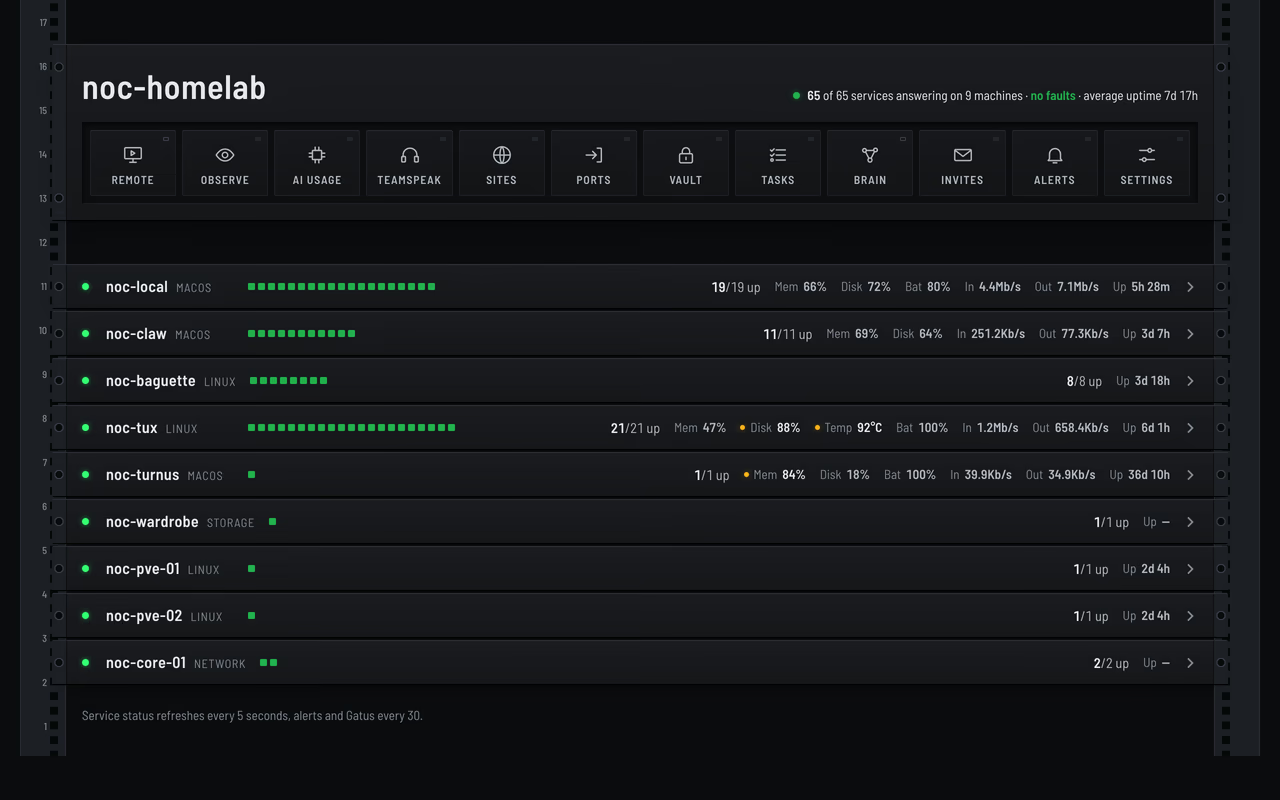
noc-local, noc-tux and noc-claw run a small Flask agent exposing a common HTTP API over Tailscale, and the dashboard combines its reports with separate checks for hosts without an agent, including noc-turnus.
Endpoints
service field.Unknown services return 404 and unknown actions 400, and the logs action takes an optional lines count (100 by default) and returns the service’s recent output.
Service registry
All three agents share one config.yaml catalogue, and each keeps only the entries for its own hostname at startup, with an id, a label and how the service is managed for each one. Platform handlers translate the uniform API onto the native service manager, systemctl on Linux, launchctl on macOS and the Docker API for containers.
After changing the shared catalogue, restart the affected host’s agent to load it, and the dashboard picks it up on the next poll.
The public status feed described in status API is an allowlisted projection of the dashboard’s combined view, which adds port and SSH checks for the hosts without an agent.
Most of the homelab lives in a 12U rack in the front room, behind a Cisco Catalyst 2960-X core switch. Four service hosts and two Proxmox nodes sit in the rack, a VPS and a storage box sit offsite, and everything talks over Tailscale.
A Windows workstation outside the rack handles gaming and GPU generation. The repository holds service configuration, deployment scripts and operational documentation.
Rack and network
The router has a single uplink into the switch, and every rack machine has its own switch port. The switch runs IOS 15.2(7)E14 with NTP, syslog into Loki, nightly config backups and a Device Manager web UI.
LibreNMS on noc-tux graphs per-port traffic from the switch over SNMPv3. It also pings every machine and a few internet targets once a minute, so latency and packet loss have a history.
Machines
Roles were checked against running services on 22 October 2026.
How it hangs together
The dashboard on noc-local uses the agent API on noc-local, noc-tux and noc-claw, with port or SSH checks for hosts without an agent and GPU generation on noc-gaming.
The dashboard also tracks token use and subscription quota for the AI tools on every host, and it alerts before a quota runs out.
Syncthing shares the working tree between noc-local, noc-tux, noc-claw and noc-turnus, and noc-local stays the only Git writer. Every compute host except the new Proxmox nodes also holds a daily encrypted recovery kit, with an offsite copy in Kopia on noc-wardrobe. The Proxmox guests are backed up every night to noc-tux instead.
Kopia runs each backup source on its own, with retries and a catch-up pass for anything that missed its night, so routine failures stay on the dashboard, and Discord only hears about the backup disk filling up, a host with no successful backup for seven days (ten for the gaming PC), or a stale health checker.
A public slice of monitoring feeds the Machines section through the status JSON, and its indicators report monitored service availability.
Security
Eight managed hosts, including the Proxmox nodes and the gaming PC, run a Wazuh agent that reports packages, known vulnerabilities, file integrity and configuration checks back to noc-tux, with active response switched off so it only ever reports.
Nightly Trivy and Grype scans of the running containers, daily package checks on the Linux hosts, a daily probe for the compromised eMudhra certificate chains on all eight hosts, and weekly outside-in scans from the VPS all feed one private status page that refreshes hourly and sorts findings into patch now, patch soon and can’t patch yet.
A security digest goes out every Monday, and the pipeline only pings Discord straight away for a new critical or known-exploited finding exposed publicly or on the LAN, a confirmed new public port, or a source more than twice its allowed reporting age.
Around the house
The Ring doorbell records a two-minute clip on every motion or ring, and a worker on noc-tux picks out faces, people, vehicles and parcels before Home Assistant sends the phone alert.
The clips land in a private Visitor Book, with a 480p copy archived offsite for six months.
noc-cloud holds the files that used to live in OneDrive, with SeaDrive for on-demand access and ONLYOFFICE for documents.
Maricel, a video-call tutor for Cebuano, Korean and Spanish, speaks through Gemini Live while her face renders on the gaming PC’s GPU, and Nocturne Studio queues AI music jobs on the hub for the same GPU to pick up.
Elsewhere
The repository lives on a self-hosted Forgejo, with selected configuration encrypted by git-crypt.
The Machines section on this site’s home page is live homelab data. It comes from a static JSON file, /homelab-status.json, regenerated every 60 seconds, so there’s no backend behind the website, just a file push.
Pipeline
- The dashboard combines agent reports with reachability and service checks for hosts without an agent.
- A LaunchAgent runs a push script each minute, which fetches that view, projects it through a public-services allowlist, folds in 24 hours of hourly history, and uploads the result to the webroots of both sites.
- The site fetches
/homelab-status.jsonclient-side and renders the machine chassis, and without JavaScript only that section is missing.
The allowlist is the privacy boundary: only explicitly listed services appear publicly, under display labels chosen for the site. A consolidated entry can group several internal services under one light, which shows online only when all of them are.
Payload
{
  "current": {
    "updated": "2026-09-11T19:00:00Z",
    "machines": [
      {
        "id": "noc-turnus",
        "label": "noc-turnus",
        "online": true,
        "uptime": "18d",
        "services": [
          { "id": "local-prompter", "label": "Local Prompter", "online": true }
        ]
      }
    ]
  },
  "history": []
}
The feed includes names, reachability, uptime and allowlisted service flags, with 24 hourly buckets of machine up and down counts alongside the current snapshot.
Retired services such as OpenClaw, gbrain and its capture jobs are left out, and so are Wazuh and every vulnerability finding, which stay on a private status page, while the attack-surface scanner and the external monitor only show whether they’re running.
For noc-wardrobe, the SFTP indicator measures transport reachability, with uptime unavailable. It does not establish snapshot freshness, repository authentication or restore success.
You need Python 3.10 or newer, and Tailscale on the machine if other devices are going to open the pages.
Run it
git clone https://git.nocfa.net/NocFA/readout.git && cd readout
python3 -m venv .venv && .venv/bin/pip install -r requirements.txt
bin/readout serve
In a second terminal, publish the sample and open the link it prints:
bin/readout publish samples/decisions.md
On the machine itself you can also open it as http://localhost:8484/d/samples-decisions, and ln -s "$PWD/bin/readout" ~/.local/bin/readout puts the command on your path.
To keep it running, start bin/readout serve from a LaunchAgent or a systemd user unit with the environment you want.
Publishing
On the machine running Readout:
readout publish notes/plan.md                 # live link to the file, prints http://my-server:8484/d/notes-plan
readout publish notes/plan.md --copy          # a snapshot instead of a live link
readout publish notes/plan.md --slug plan     # choose the link name
readout publish notes/plan.md --project notes # group it under a project on the index
cat plan.md | readout publish - --slug plan   # from stdin
readout answered notes-plan                   # the reader replied, take it off Needs you
readout reopen notes-plan                     # put it back on Needs you
readout tasks notes-plan                      # what the reader has ticked, --json for the raw list
readout ls                                    # status, project, link and title of every doc
readout rm notes-plan                         # unpublish
Republishing the same file keeps its link, and removing a live doc leaves the file alone.
From another machine, post the text, and the reply is JSON with the url:
curl -fsS --data-binary @plan.md "http://my-server:8484/api/publish?slug=my-plan&source=my-laptop"
On Windows use curl.exe with the same arguments, and a machine with its own copy of the repo can run READOUT_SERVER=http://my-server:8484 readout publish plan.md instead, which posts a copy the same way.
Configuration
| Variable | Default | What |
|---|---|---|
READOUT_PORT | 8484 | listen port |
READOUT_BIND | every interface | listen address |
READOUT_PUBLIC_URL | http://<hostname>:<port> | base of the links the server prints and lists |
READOUT_HOME | ~/.local/share/readout | the registry and the posted copies |
READOUT_DROP_URL | unset | drop server for Share, the button is hidden while this is unset |
READOUT_SHARE_DAYS | 7 | how long a shared copy lasts |
READOUT_DROP_LOGIN | ~/.config/readout/drop-login | where readout drop-login keeps the drop owner login key |
READOUT_LOG | unset | any value logs every request to stderr |
READOUT_SERVER | this machine, port 8484 | the server the readout command talks to |
Sharing outside the tailnet
Share uses drop through its protocol v1, so set READOUT_DROP_URL to your drop server for the server and the CLI, then save the owner login once, as the user that runs the server:
export READOUT_DROP_URL=https://drop.example.com
printf '%s\n' "$DROP_PASSWORD" | readout drop-login
Readout derives the login key from the password, checks it against the server and saves only the key, with mode 600.
Pressing Share renders a single HTML file with the CSS, fonts, contours and a live doc’s images inlined and the scripts left out, encrypts it following drop’s protocol and uploads it with a READOUT_SHARE_DAYS expiry.
The link carries its key in the #fragment, recipients download the .html from the drop page, and later edits to the doc don’t reach the shared copy.
Develop
There is no build step, so edit the Python, CSS or JS and reload, restarting the server after Python changes, and a hard refresh picks up CSS and JS edits straight away since static files are cached for five minutes.
A throwaway server keeps experiments away from your real library:
READOUT_HOME=/tmp/readout-dev READOUT_PORT=8499 READOUT_BIND=localhost PYTHONPATH=. .venv/bin/python -m readout.server
READOUT_SERVER=http://localhost:8499 bin/readout publish samples/decisions.md
python3 tools/contours.py regenerates static/contours.svg from a fixed seed, with no dependencies.
Readout turns the markdown that AI agents write into calm pages that are easy to read and act on, built for readers with ADHD or autism and for anyone who finds raw markdown tiring.
An agent publishes a file with one command and hands over the link, and the page pins whatever waits on the reader into a box at the top, then keeps itself up to date while the agent goes on editing the file.
Running your own is on the install page, writing for Readout covers the markdown it understands, and the source is on Forgejo.
What it does
- What needs you: every
NEXTandDECIDEcallout in a doc is copied into a purple box at the top of the page, so the first screen says what the doc is and what the reader has to do. - Live links:
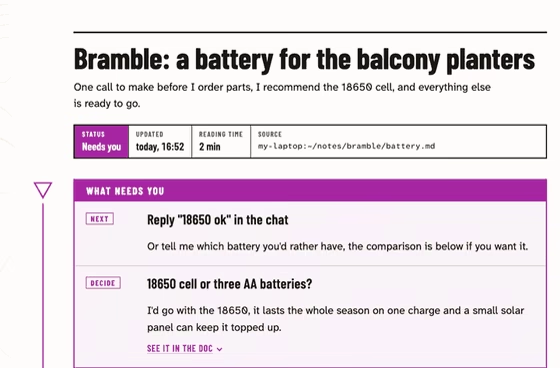
readout publish plan.mdprints a link to the file itself, and the open page swaps in the new version whenever the file changes, keeping the reader’s scroll position. - Focus mode: pressing F or the Focus button dims everything except the section being read and draws the course line as far as its control circle.
- Checklists: task lists become tick boxes, with the ticks saved on the server so every device and every agent sees the same list.
- Pick up where you stopped: coming back to a doc offers a jump to the section the reader left off in.
- Copying: code blocks get a Copy button, and clicking inline
codecopies it. - Themes: light and dark follow the system, and the Theme button cycles system, light and dark.
- Share: when a drop server is configured, the Share button uploads an end-to-end encrypted single-file copy of the page and shows the link, for people outside the tailnet.
Here focus mode is switched on at the top of a doc, and the course line draws itself down to each control as the page scrolls.
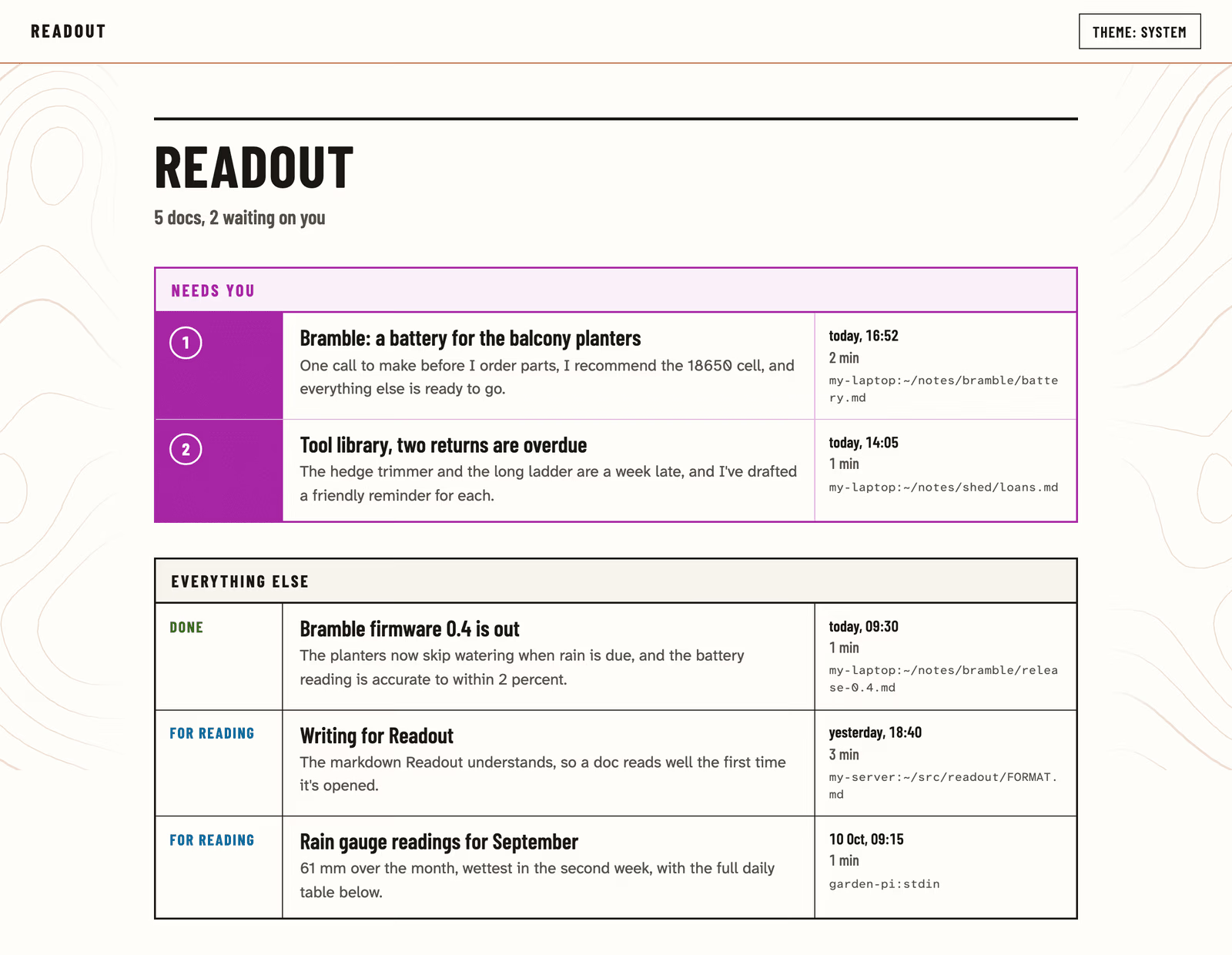
The index at / lists every published doc newest first, grouped by project, with the ones waiting on the reader numbered in their own purple group at the top.
Once the reader has replied to a doc, Mark answered (or readout answered from the agent) takes it out of that group until the doc asks something new.
On a phone the meta strip and the asks stack into one column, and the course controls move inline beside each heading.
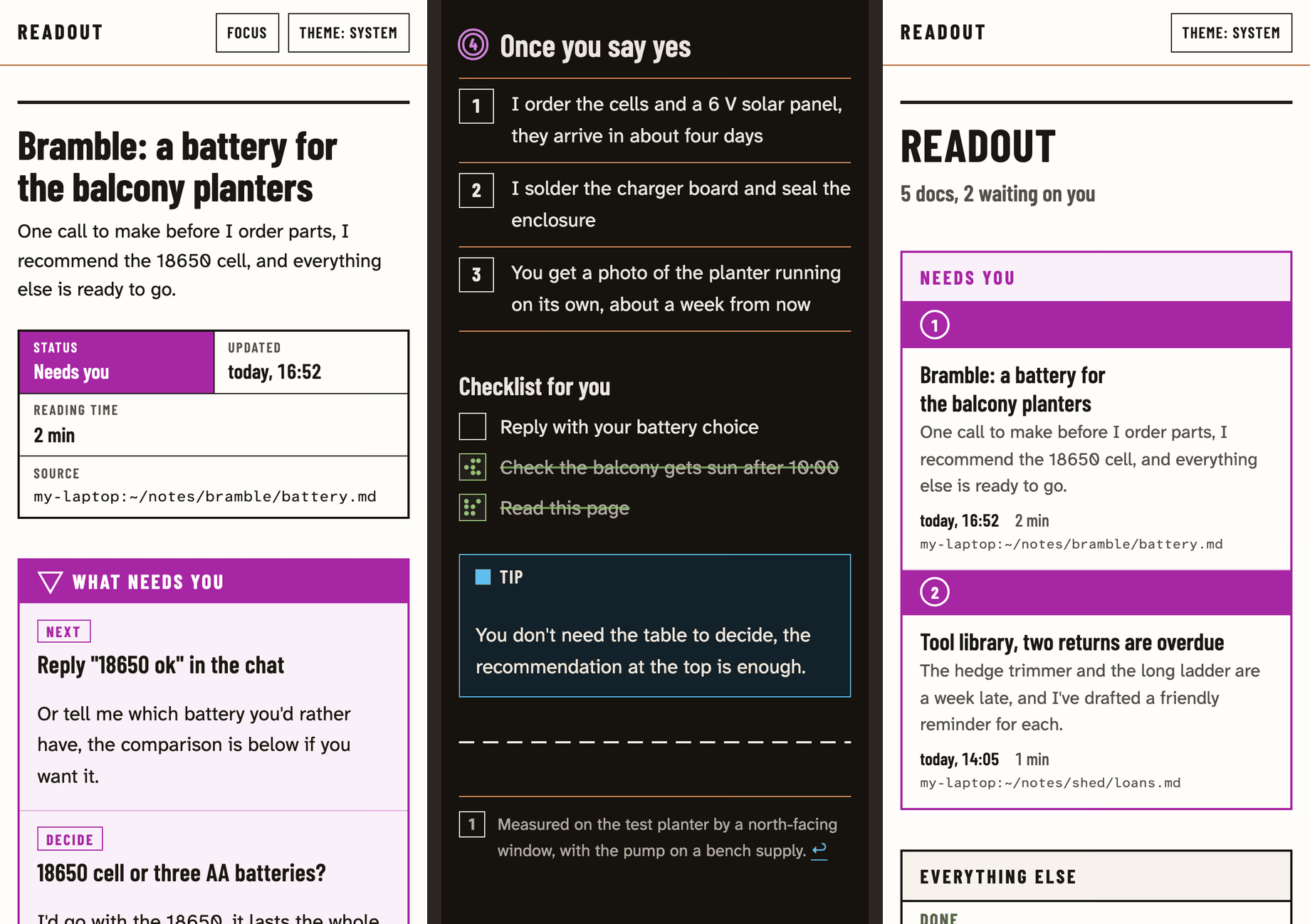
How it looks
Every doc is drawn as an orienteering map, with the map inks kept as fixed roles: brown for structure, green for done, blue for notes and links, yellow for highlights and warnings.
Course purple is printed only over what needs the reader, so the asks box, the start triangle, the numbered control at each section and the line joining them are the only purple on the page, and generated contour terrain fills the margins on wide screens without ever sitting behind the text.
Body text is Atkinson Hyperlegible Next in a 68-character column with Barlow Condensed for headings and labels, the margin contours rise like a slow tide and drift a little as you scroll, and all of that motion switches off under reduced motion.
How it fits together
The server is one Python process using the standard library’s http.server, with markdown-it-py for parsing, Pygments for highlighting and PyYAML for front matter.
It keeps a registry of published docs, where a live doc points at a file on disk and a posted doc is a stored copy, and it renders each doc again only when the file’s modified time changes.
Open pages listen on /events/<slug>, a server-sent event stream that fires when the file changes, and then fetch and swap in the new page.
| Path | What |
|---|---|
readout/render.py | markdown to HTML: front matter, callouts, folds, sections, heading ids, highlighting |
readout/page.py | the doc page and index HTML |
readout/server.py | HTTP server, registry, live reload, publish and share endpoints, the access checks |
readout/drop.py | the drop protocol v1 client behind Share |
readout/cli.py, bin/readout | the readout command |
static/ | the CSS, the page script, the contour tile and the self-hosted fonts |
tools/contours.py | generates static/contours.svg, a seamless tile of contour lines |
FORMAT.md, DESIGN.md | the markdown dialect and the design system |
Security
Readout has no accounts, so anyone who can reach it can read and publish, and the protection comes from narrowing who can reach it.
- It only answers Tailscale addresses and loopback, and drops every other connection before it gets a thread.
- The
Hostheader has to name the machine, which stops a DNS-rebinding page from talking to it. - Browser POST and DELETE requests from another origin are refused, while curl and the CLI send no
Originand pass. - Docs come from many agents, so raw HTML in them keeps only images, line breaks and plain formatting, and pages only run Readout’s own script under a Content Security Policy.
- Publishing a path only works from loopback, so other machines can post text but can’t make it serve their choice of file, and a live doc’s relative assets are limited to images inside its own folder.
Licence and credits
Readout is MIT licensed.
The self-hosted fonts are Atkinson Hyperlegible Next and Atkinson Hyperlegible Mono by the Braille Institute and Barlow Condensed by Jeremy Tribby, each under the SIL Open Font License 1.1 with its licence text beside it in static/fonts/.
The screenshots and recording were made on a local test server with made-up docs.
Readout reads ordinary GitHub-flavoured markdown plus a few extras, so anything that renders on GitHub renders there too, and the extras below are what make a page easy to act on.
Every Readout server also shows this guide as a page at /format.
Front matter
Put this at the very top of the file, every field is optional but summary matters most:
---
title: Bramble, a battery for the planters
summary: One call to make before I order parts, I recommend the 18650 cell.
status: needs-you
project: bramble
---
titleis the page heading, and without it the first# Headingis used, then the file name.summaryis one plain sentence that says what the doc is and what you want, shown under the title and in the list of docs.statusisneeds-you,infoordone, and when you leave it out the page says “Needs you” if it has aNEXTorDECIDEcallout and “For reading” otherwise.projectgroups the doc with the rest of its project on the index, and without it Readout uses the git repo the file lives in, so set it for anything written outside its project’s folder.
Callouts
A blockquote whose first line is [!KIND] becomes a callout, and any text after the marker on that line becomes its title:
> [!NEXT] Reply "18650 ok" in the chat
> Or tell me which battery you'd rather have, the comparison is below.
| Kind | Use it for |
|---|---|
NEXT | the one action the reader should take, pinned at the top of the page |
DECIDE | a choice only the reader can make, with your recommendation, also pinned at the top |
DONE | work that’s finished, so the reader can stop worrying about it |
WARNING | something that could go wrong or cost something |
CAUTION | something risky or irreversible |
NOTE, TIP, IMPORTANT | side information |
Every NEXT and DECIDE is copied into the “What needs you” box at the top, so keep them short, put the action in the title line and the detail underneath, and use at most one NEXT.
Folds and checklists
Detail most readers can skip goes in a fold, which starts closed:
::: more Why not a coin cell?
The longer explanation goes here.
:::
Task lists become tick boxes the reader can tick, saved on the server so they show on every device:
- [ ] Reply with the two answers
- [x] Read this page
Each tick is tied to the item’s wording, so keep an item’s text the same once it’s published, since a reworded item starts unticked.
readout tasks my-plan, or curl -fsS http://my-server:8484/api/docs/my-plan/tasks from another machine, gives every item with done and ticked_at.
Everything else
- Headings split the page,
##for sections and###inside them, and each##section is one unit for focus mode. - Numbered lists read as steps, so use them for anything done in order.
- Tables, fenced code with a language (highlighted, with a Copy button), images and footnotes all work.
- Inline
codecopies itself when clicked, so use it for commands, paths and values the reader might paste. - Bare links, email addresses and paths such as
~/dev/appbecome clickable or show as code on their own,Ctrl+Fstyle shortcuts show as keys, and==words==get the yellow highlighter. - Raw HTML keeps only
<img>,<br>and plain formatting like<b>,<i>and<kbd>, so write markdown instead.
Shape that works
- Front matter with a
summarythat answers “what is this and what do you want from me”. - A
NEXTorDECIDEright after it, when anything waits on the reader. - Sections in the order the reader needs them, short paragraphs, lists over walls of text.
- Background, logs and long reasoning in folds at the end.
When the reader answers
The reader usually answers in chat, so once they have replied to everything a doc asks, mark it answered and it leaves the “Needs you” group:
readout answered my-plan          # the slug, the link, or the published file's path
readout reopen my-plan            # put it back if it still needs them
From another machine, curl -fsS -X POST http://my-server:8484/api/docs/my-plan/answered does the same, and -X DELETE on that address reopens it.
An answered doc comes back by itself if its NEXT or DECIDE callouts change later, so a new question is never missed, and status: done keeps a finished page as a record without the pinned box.
You need Python 3.10 or newer and uv on the machine that runs desktop-control, plus key-based SSH from it to every desktop it drives.
git clone https://git.nocfa.net/NocFA/desktop-control-mcp.git ~/src/desktop-control-mcp && cd ~/src/desktop-control-mcp
mkdir -p ~/.config/desktop-control
cp hosts.example.yaml ~/.config/desktop-control/hosts.yaml   # then edit it
./install.sh
install.sh builds .venv, links desktopctl into ~/.local/bin, registers the server with Claude Code (user scope) and Codex when they are installed and runs the tests, so add ~/.local/bin to your PATH if it isn’t there already.
DESKTOP_CONTROL_HOSTS, DESKTOP_CONTROL_SECRET_CMD, DESKTOP_CONTROL_AUDIT_LOG and DESKTOP_CONTROL_LOG_TEXT, when set while you run it, are saved into both registrations.
Codex asks before every MCP call and codex exec cannot answer, so run the installer with DESKTOP_CONTROL_CODEX_APPROVE=1 to approve this server’s tools there.
Hosts and secrets
hosts.example.yaml documents every field: the transport, the address or SSH target, the badge type, the secret names for the VNC password and unlocking, and an optional note that is passed on to the agent as is, for example “this is someone’s own workstation, say what you are about to do first”.
Secrets are referred to by name only, and each name is read from an environment variable by default, while secret_command in the hosts file (or DESKTOP_CONTROL_SECRET_CMD) runs a password manager instead, with {key} replaced by the name and no shell involved.
The command’s whole output is typed, so it has to print the password and nothing else, and examples/pass-first-line.sh is a wrapper that does that for pass.
To keep a Mac’s login password in the macOS keychain, for example:
security add-generic-password -a desktop-control -s STUDIO_LOGIN_PASSWORD -w # prompts for the password
then set secret_command: "security find-generic-password -a desktop-control -s {key} -w" in the hosts file, and check it with desktopctl screenshot studio-mac, which logs in with that password, before relying on it.
Each host can only receive its own unlock_secret and typeable_secrets, so a password stored for one machine can’t be typed into another.
Values stay in the server’s memory for up to an hour (environment variables for as long as the process runs), never appear in tool output, process arguments or the audit log, and desktop_type_secret skips its usual screenshot unless asked, since some fields show what was typed.
Anything the agent can see on screen, it can read, so only type secrets into real password fields.
| Variable | Default | What |
|---|---|---|
DESKTOP_CONTROL_HOSTS | ~/.config/desktop-control/hosts.yaml | the hosts file |
DESKTOP_CONTROL_SECRET_CMD | unset | overrides secret_command |
DESKTOP_CONTROL_AUDIT_LOG | ~/Library/Logs/desktop-control/audit.jsonl on macOS, ~/.local/state/desktop-control/audit.jsonl elsewhere | the audit log |
DESKTOP_CONTROL_LOG_TEXT | 1 | 0 logs only the length of typed text |
DESKTOP_CONTROL_MAX_EDGE, DESKTOP_CONTROL_MAX_PIXELS | 1568, 1150000 | the screenshot “view” size |
DESKTOP_CONTROL_CALLER | set per client by install.sh | the agent name on the badge and in the log |
Setting up each machine
macOS. Turn on Screen Sharing in System Settings, General, Sharing, and allow ARD’s Diffie-Hellman login with sudo defaults write /Library/Preferences/com.apple.RemoteManagement allowInsecureDH -bool true, then turn Remote Login on for the lock-state checks over SSH.
Linux. Install the X11 tools on the desktop machine, for example sudo apt install xdotool imagemagick x11-utils, and log in to an X11 session through GDM with autologin, since the transport uses GDM’s Xauthority and needs the console to always be there.
Windows. Install the OpenSSH server, make PowerShell its default shell, then run windows/install-tightvnc.ps1 as an administrator:
New-ItemProperty -Path HKLM:\SOFTWARE\OpenSSH -Name DefaultShell -Value C:\Windows\System32\WindowsPowerShell\v1.0\powershell.exe -PropertyType String -Force
TightVNC stores its two passwords, the viewer and the control password of eight characters at most, in an obfuscated form that desktopctl vnc-hex produces from two lines on stdin and windows/set-tightvnc-auth.ps1 stores, so the passwords never appear in a command line:
printf '%s\n%s\n' "$VNC_PASSWORD" "$VNC_CONTROL_PASSWORD" | desktopctl vnc-hex \
  | ssh gaming-pc "powershell -NoProfile -ExecutionPolicy Bypass -File C:\path\to\set-tightvnc-auth.ps1"
Store the same viewer password where password_key points, and run windows/install-lock-task.ps1 as the signed-in user so desktop_lock works, which the badge installer below also does.
Microsoft’s OpenSSH guide covers starting the server and authorising your key.
Badges
The badges are optional, installed per machine, and only show where installed.
- macOS:
swiftc -O badge/macos/Badge.swift -o DesktopControlBadge, copy it to the Mac, fill in__BIN__,__PEER__(the address desktop-control connects from) and__LOG__inbadge/macos/com.noc.desktop-control-badge.plist, put it in~/Library/LaunchAgents/and load it withlaunchctl bootstrap gui/$(id -u)and that path. - Linux:
sudo apt install python3-gi python3-gi-cairo gir1.2-gtk-3.0, copybadge/linux/badge.pyto~/.local/share/desktop-control/and the unit beside it to~/.config/systemd/user/, thensystemctl --user enable --now desktop-control-badge. - Windows: copy
badge/windows/Badge.cstoC:\ProgramData\desktop-control\and runbadge/windows/install-badge.ps1as the signed-in user, which compiles it and adds a logon task.
Platform notes
macOS. The Mac reads Super_L as Command and Meta_L as Option, which the transport handles, and printable characters are typed as characters, so Option-letter composition is not available.
At the lock screen macOS drops keystrokes for about two seconds after a session starts, so keyboard input waits three seconds after connecting and secrets are typed slowly.
macOS locks a Mac again as soon as the session that unlocked it ends, which leaves the machine as it was found, but desktopctl reconnects on every call and so has to unlock each time.
Linux. The transport finds the X display whose socket accepts the GDM Xauthority, which suits a GDM autologin console session, and desktop_unlock and desktop_lock use loginctl unlock-session and lock-session over SSH, so nothing is typed.
Wayland sessions and the GDM greeter itself are out of reach.
Windows. windows/install-tightvnc.ps1 installs a pinned TightVNC server, with its SHA-256 and signature checked, as a service that only accepts loopback connections, and windows/set-tightvnc-auth.ps1 sets its passwords from stdin.
TightVNC drives the lock screen only on a connection opened after the lock appeared, so desktop_unlock reconnects before typing and again afterwards, and since a Windows Hello PIN submits itself, Enter is only pressed if the machine is still locked.
desktop_lock runs the DesktopControlLock scheduled task that install-badge.ps1 registers, because LockWorkStation only works inside the desktop session.
Sending ctrl+alt+delete arrived as ordinary keystrokes in testing, so avoid it.
desktop-control is an MCP server that gives Claude Code, Codex or any MCP client its own screen view, mouse and keyboard on the logged-in desktops of your Macs, Linux boxes and Windows PCs.
It is for the GUI-only steps an agent otherwise has to hand back to you, such as macOS privacy prompts, System Settings panes, lock screens, installers, GNOME dialogs and Windows prompts, and a desktopctl command offers the same actions from a shell, with both sharing one core, one host list and one audit log.
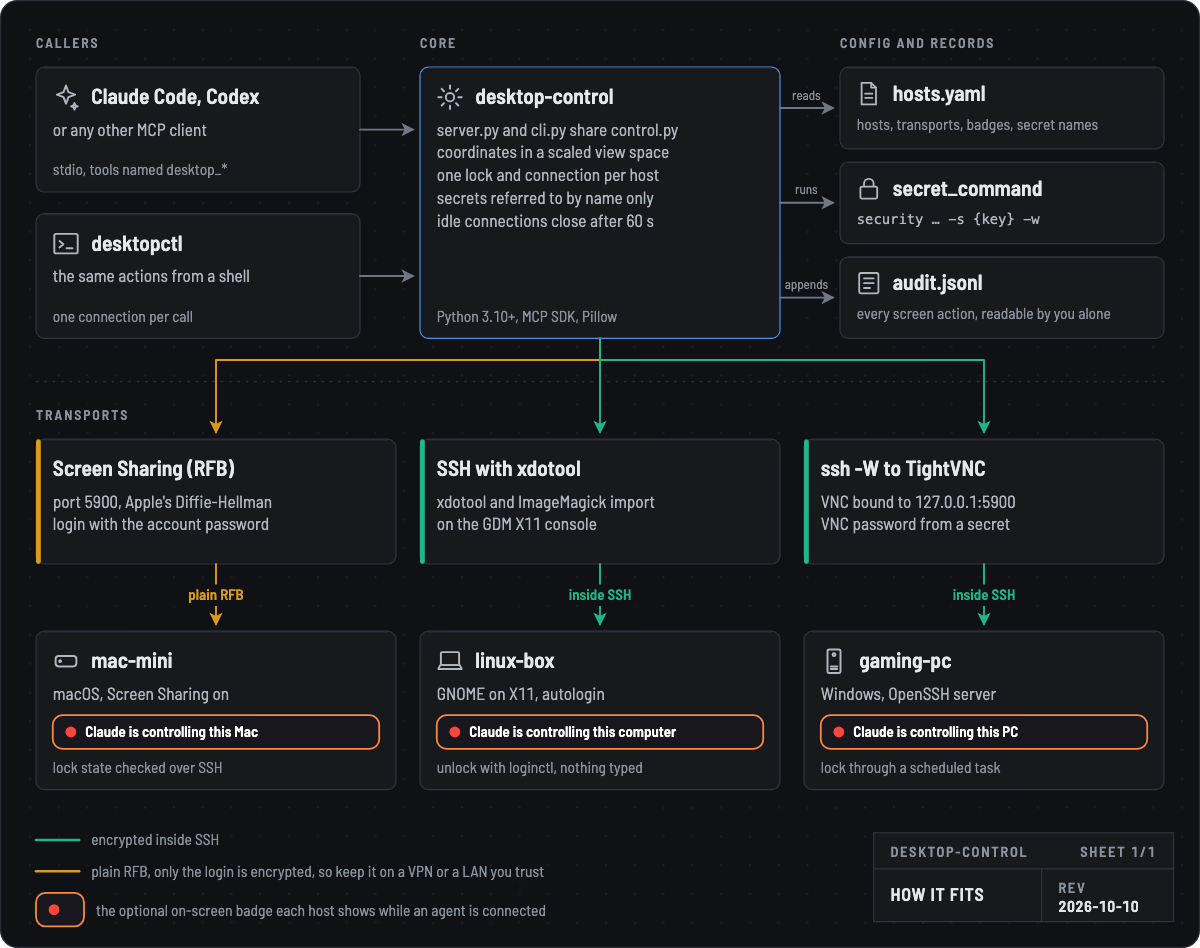
Installing it and setting up each machine is on the install page, and the source is on Forgejo.
This tool lets an AI agent see your screens, type, click and unlock machines with stored passwords, with the same reach as a person at the keyboard.
Only list machines you are happy for an agent to drive, keep the hosts file and the secrets it names private, and never expose the server or the VNC ports to the internet.
Every screen action lands in an audit log, and once you install the optional badge on a machine, it tells anyone there that an agent is in control.
Transports
| Desktop | How it connects | Authentication |
|---|---|---|
| macOS | Screen Sharing (RFB) on port 5900 | Apple Remote Desktop Diffie-Hellman with the account’s login password |
| Linux (X11) | SSH, then xdotool and ImageMagick import on the console display | SSH key |
| Windows | TightVNC bound to 127.0.0.1:5900, reached with ssh -W | VNC password |
Lock state and unlocking also go over SSH, so each machine needs key-based SSH from the one running desktop-control.
VNC itself is not encrypted and macOS Screen Sharing only encrypts the login, so screenshots and typed passwords cross the network in the clear.
Reach Macs only over a network you trust, such as a WireGuard or Tailscale VPN or a wired LAN you control, and use via_ssh wherever the VNC server can be bound to loopback, as the Windows setup does.
When a host has a VNC password configured, desktop-control refuses a server that only offers the unauthenticated “None” security type, so a host that should ask for a password is never driven without one.
Using it
Start with desktop_screenshot(host), whose reply states a “view” size such as 1334x862, the real framebuffer scaled to fit the model’s image budget, and every other tool takes coordinates in that view space, so Retina and 5K screens behave like a small one.
desktop_screenshot(host, region=[x, y, w, h]) returns that part of the screen at higher resolution for reading small text, with the formula for mapping its pixels back.
| Tool | Purpose |
|---|---|
desktop_hosts | List hosts and, once connected, their screen and view sizes |
desktop_screenshot | Whole screen in view space, or a zoomed region |
desktop_click | Left, right or middle click, double click with count=2, optional held modifiers |
desktop_move, desktop_drag, desktop_scroll | Hover, drag along a path, wheel scroll |
desktop_key | A key or chord such as enter, escape, cmd+q, ctrl+alt+t |
desktop_type | Type text into the focused field, never a password |
desktop_unlock, desktop_lock, desktop_lock_state | Get past a lock screen in one step, lock again, or report unlocked, locked or login window |
desktop_type_secret | Type one of the host’s stored passwords without revealing it, optionally pressing Enter, with no screenshot by default |
desktop_disconnect | Drop cached connections |
Action tools return a fresh screenshot after a short settle delay unless screenshot=false is passed, and connections close after a minute idle or straight away with desktop_disconnect(host).
desktopctl screenshot studio-mac -o /tmp/studio.png
desktopctl click studio-mac 705 311
desktopctl key studio-mac cmd+q
desktopctl type-secret studio-mac STUDIO_LOGIN_PASSWORD --enter
A screenshot that comes back completely black is retried once and then the display is woken, with Shift over VNC or a 1 px pointer jiggle on X11, and the reply says so.
On-screen badge
While an agent is connected, every monitor on that machine shows a small badge at the top right saying who is in control, so nobody at the keyboard fights it for the mouse.
The badge never takes focus, lets clicks pass through and clears about ten seconds after the session ends.
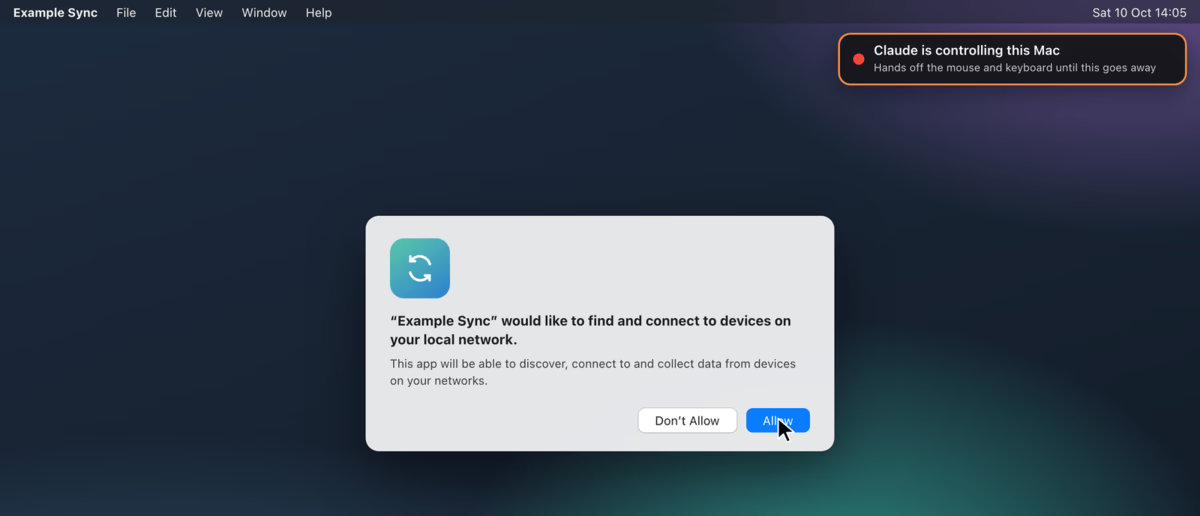
The name comes from the client (Claude, Codex, or “An AI agent” when it can’t tell), and the wording follows the machine.

| Desktop | Helper | How it knows |
|---|---|---|
| macOS | badge/macos/Badge.swift, run by the LaunchAgent template beside it | An established connection to local port 5900 from the --peer addresses |
| Linux | badge/linux/badge.py (GTK 3) and the user unit beside it | A lease in /run/user/<uid>/desktop-control-lease that every xdotool command renews |
| Windows | badge/windows/Badge.cs, installed as a logon task by install-badge.ps1 | An established connection to 127.0.0.1:5900, which only desktop-control makes |
It can’t appear over the macOS or GNOME lock screen, so the only uncovered moment is the few seconds of typing the password, during which macOS shows its own “Your screen is being observed”.
Audit log and tests
Every screen action, from screenshots, clicks, keys and typing to unlocking and locking, is appended to the audit log with the host, action, parameters, result, duration, process and caller, while lock-state checks and disconnects are not.
Typed text is logged up to 300 characters, or only its length with DESKTOP_CONTROL_LOG_TEXT=0, secrets are logged by name only, and the log is created readable by your user alone.
.venv/bin/python -m unittest discover -s tests runs offline tests for key parsing, view scaling, the VNC and ARD authentication maths, secret lookup and the RFB wire path against a fake server.
Licence
desktop-control is MIT licensed, and its dependencies keep their own licences: the MCP SDK, cryptography, PyYAML and Pillow are permissive (Pillow’s wheels also bundle the LGPL FriBiDi library), while the optional Linux badge uses GTK 3 and PyGObject (LGPL-2.1+) and Pycairo (LGPL-2.1 or MPL-1.1).
TightVNC, which the Windows installer downloads, is GPL software from GlavSoft.
The diagram embeds the Barlow Semi Condensed typeface, which is under the SIL Open Font License 1.1, and the badge pictures are drawn from the badge sources over a made-up desktop.
drop is a self-hosted, end-to-end encrypted way to send files, folders and messages, where the link works the moment you create it and a friend’s download keeps pace with your upload.
Think of a self-hosted take on Wormhole with PrivateBin-style messages, one small Go binary with no dependencies beyond the standard library, plus a static web app.
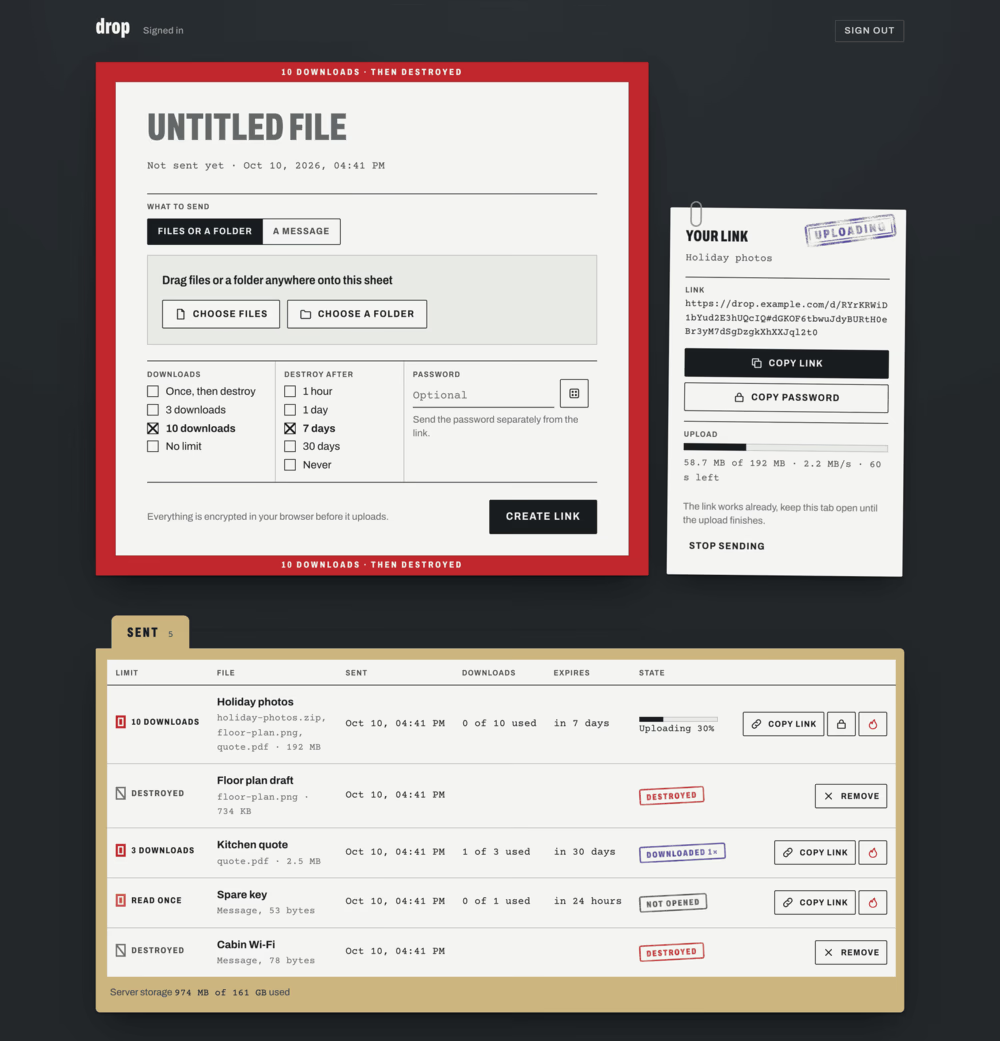
Running your own is on the install page, building a frontend covers the client API, and the source is on Forgejo.
What it does
- Encryption: everything is encrypted in the browser, and the key rides in the link’s
#fragment, so the server only ever holds ciphertext. - Burning: drops burn after N downloads, when they expire, or on demand by the sender or a recipient, and the server enforces it.
- Passwords: an optional password is mixed into the key, so guessing it needs the link, and someone who only has the link has to guess through the server’s rate limits, though anyone who also gets a copy of the server’s disk can test passwords offline, so use a long one when that matters.
- Big files: downloads stream through a service worker straight to disk without holding the file in memory, whole folders arrive as a single zip, and interrupted transfers pick up where they stopped, with each file up to 1 TiB once encrypted.
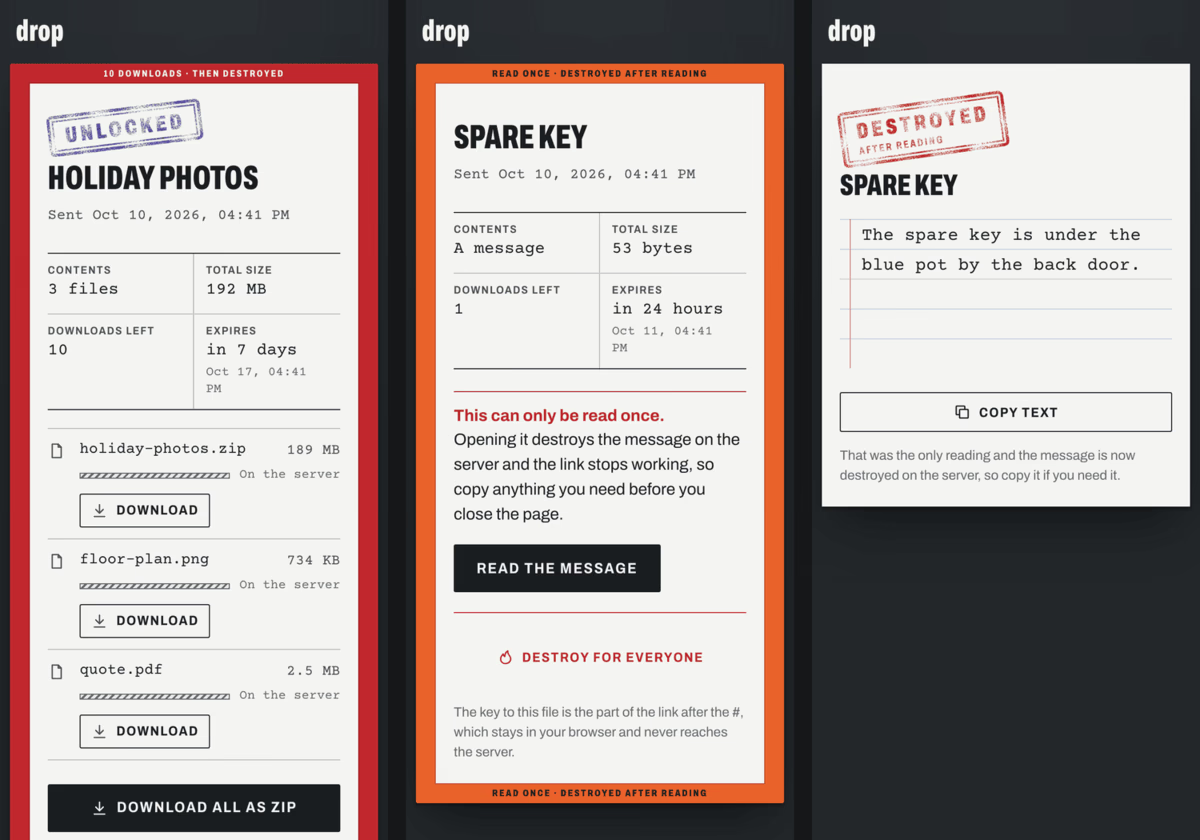
- Messages: a typed message travels the same way as a file, and a read-once message sits behind a reveal step with a clear warning, because reading it spends it.
- Sent list: the owner’s list of sent drops is an encrypted vault that follows them to any device they sign in on, where they can copy a link or password again, resume an interrupted send or burn a drop.
Recipients never sign in, because the link carries everything they need.
They see what was sent, how big it is, how many downloads are left and when it expires, then save one file or everything as a zip, and a recipient can also destroy the drop for everyone.
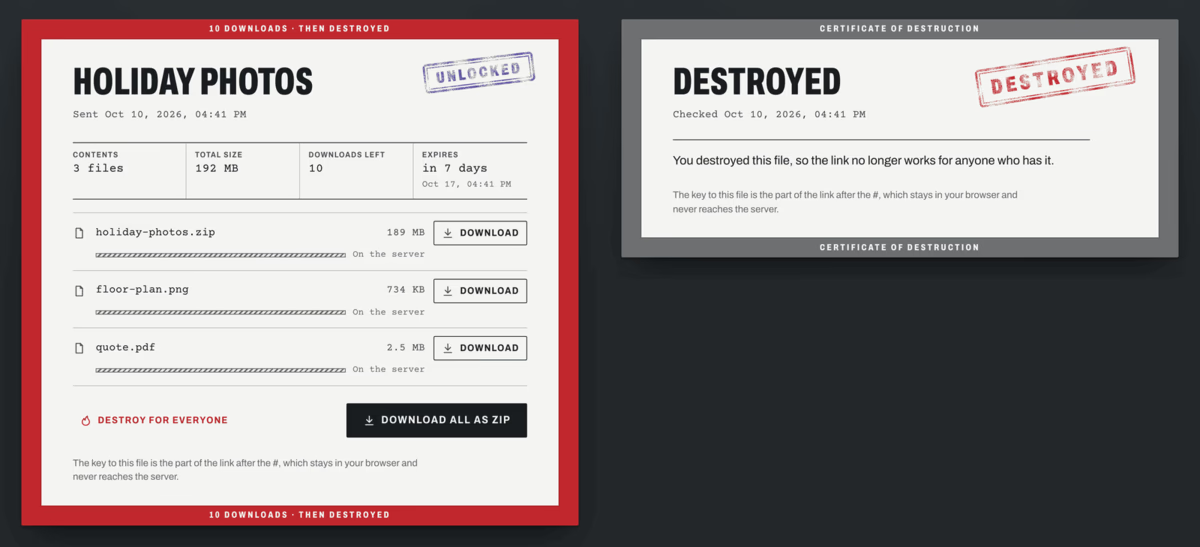
Here the sender creates a link and a friend opens it while the upload is still running, then saves both files as one zip, with the hatched bars showing what has reached the server and the solid bars what has arrived in the friend’s browser, decrypted.
On a phone the cover sheet folds into one column, and the read-once message lifts away to a destroyed stamp once it has been read.
How it fits together
The sender’s browser encrypts each file in 1 MiB records with AES-256-GCM and uploads the ciphertext in chunks, and the link works as soon as the drop exists on the server, before any byte has arrived.
dropd serves a recipient every contiguous byte it has and waits for more, so a download can start mid-upload, and the recipient’s service worker decrypts the stream straight to disk.
Key derivation, the wire format, burn rules, abuse limits and what the server learns are all in PROTOCOL.md.
| Path | What |
|---|---|
server/ | dropd, Go standard library only, one static binary |
web/lib/core.js | key derivation, record encryption, streaming decryption (plain script, also loaded by the service worker) |
web/lib/zip.js | streaming ZIP/ZIP64 writer for folder downloads |
web/lib/drop.js | the client API a frontend imports |
web/sw.js | service worker that decrypts downloads straight to disk |
web/index.html, web/app.js, web/js/ | the frontend: the owner’s desk at / and a recipient’s cover sheet at /d/<id> |
test/ | end-to-end tests (Node), browser tests (Playwright), ZIP64 check |
The visual language of the web app, with its cover sheets, handling bands and rubber stamps, is written up in DESIGN.md.
Measured on 2026-09-29
- Upload: 94 to 108 MiB/s from a laptop on the LAN through the public HTTPS address, which is gigabit wire speed.
- Crypto: 1.2 GB/s encrypting and 1.5 GB/s decrypting in Node on an M1.
- Live race: a 3 GiB upload with a local recipient that got its first decrypted bytes 0.7 s in and finished 0.2 s after the upload, while a VPS in Montréal received a byte-identical copy at 20.5 MB/s, the limit of the home upload.
Licence
drop is MIT licensed, and the Archivo and Courier Prime fonts in web/fonts/ are under the SIL Open Font License, with their licence texts beside them.
The screenshots and recording were made on a local test server with made-up files and messages.
The bundled web app is one frontend on top of a small client library, and another one only has to import /lib/drop.js, keep sw.js at the site root and keep the CSP free of inline scripts, since dropd sends script-src 'self'.
The full brief, with return shapes, every state to design, the progress events and how to adapt the tests, is in FRONTEND.md.
Screens and the calls behind them
| Screen | Calls |
|---|---|
| Sign in | client.login(pw), which stretches the password in the browser and keeps the vault key on client, then loadVault(client) for the sent list |
| Send | client.create({files | text, password, expiresIn, maxDownloads, title}) returns out.link at once, so show it and start out.upload({onProgress}) straight away, then store await out.record() with updateVault(client, items => items.unshift(item)) alongside the upload |
| Resume a send | client.resume(item, files) with the vault item and the same files picked again, which checks size, date and fingerprint, then upload({resume: true}) |
| Sent list | vault items (links and passwords included), joined with client.list() for live progress, downloads and expiry, burning with client.burnOwned(id) and removing the item with updateVault |
| Receive | client.open(location.href, password), asking for a password on needs-password or wrong-password, where inc.files and inc.uploading describe the drop and inc.refresh() is cheap enough to poll every few seconds |
| Download | inc.save([n]) for one file or inc.save() for all as a zip, with progress on BroadcastChannel('drop-progress') as {token, bytes, done, error}, and the result of inc.claim() kept in sessionStorage and passed back to inc.claim(saved) after a reload, so a refresh doesn’t spend another download |
| Message | inc.text(), which uses the download up because it acks straight away, so show a reveal step first when state.remaining is 1 |
| Burn | inc.burn() for a recipient, out.burn() or client.burnOwned(id) for the sender |
Error codes
Errors are DropError with a code, and the frontend should phrase each one for its situation.
| Code | Meaning |
|---|---|
needs-password, wrong-password | the drop has a password, or the one given is wrong |
bad-link | the link is damaged or incomplete |
not-found | the drop is gone: burned, expired or never existed |
gone | all downloads have been used |
rate-limited | too many failed requests |
corrupt | the data failed its integrity check |
truncated, network | the connection dropped (retried automatically) |
no-space | the server is out of storage |
unauthorized, vault | the owner isn’t logged in, or the vault didn’t unlock |
mismatch | files picked for a resume aren’t the ones that were being sent |
conflict | the sent list changed on another device (updateVault retries this for you) |
drop needs an HTTPS reverse proxy in front, such as Caddy, Traefik or nginx, because browsers only run the service worker and the crypto APIs on secure origins.
You also need Docker with Compose v2 and a DNS name pointing at the machine.
Run it
git clone https://git.nocfa.net/NocFA/drop.git && cd drop
cp docker-compose.example.yml docker-compose.yml   # set DROP_PUBLIC_URL and the limits
docker compose build
docker run --rm -i drop:local hash-password > owner.hash   # type the owner password (12+ characters) and Enter
chmod 600 owner.hash && mkdir -p data && sudo chown 1000:1000 data owner.hash
docker compose up -d
curl http://127.0.0.1:8080/healthz
Then point the proxy at 127.0.0.1:8080, for example with this Caddyfile, which also fetches the certificate:
drop.example.com {
	reverse_proxy 127.0.0.1:8080
}
Open your address and sign in with the owner password to send.
Configuration
| Variable | Default | What |
|---|---|---|
DROP_OWNER_HASH_FILE or DROP_OWNER_HASH | required | output of dropd hash-password, the server never sees the password itself |
DROP_LISTEN | :8080 | listen address |
DROP_DATA | /data | where drops, sessions and the owner’s vault are stored |
DROP_STATIC | /web | the web app folder |
DROP_MAX_BYTES | 150g | total stored ciphertext |
DROP_MIN_FREE | 20g | free disk space that must remain |
DROP_MAX_EXPIRY | 0s (none) | longest expiry a sender may pick, for example 720h |
DROP_TRUSTED_PROXIES | 127.0.0.1/32,::1/128 | proxies whose X-Forwarded-For is believed, for rate limits |
DROP_STALL_TIMEOUT, DROP_TICKET_TTL, DROP_DELIVERY_GRACE, DROP_ABANDON_AFTER | 30m, 24h, 10m, 168h | upload stall cut-off, download ticket life, grace before an unacknowledged download counts, and when an unfinished upload is cleared |
DROP_PUBLIC_URL | empty | your public origin, used for absolute link-preview URLs |
DROP_SITE_NAME | drop | og:site_name in link previews |
DROP_FOOTER_TEXT, DROP_FOOTER_URL | empty | an optional footer link, hidden while the text is empty |
DROP_INSECURE_COOKIES | empty | set to 1 for plain-http local testing only |
Develop and test
You need Go 1.24 or newer with a C compiler for the race detector, Node 20.11 or newer, and for the browser and archive checks Python 3, unzip, bsdtar and about 5 GB of free temporary space.
git clone https://git.nocfa.net/NocFA/drop.git && cd drop
python3 -m venv .venv && .venv/bin/pip install playwright
.venv/bin/playwright install --with-deps chromium firefox webkit

go test -race ./server                         # server unit and protocol tests
go build -o /tmp/dropd ./server
node --test test/e2e.test.mjs                  # real server, real crypto, races, burns, zip, vault
.venv/bin/python test/browser_test.py          # Chromium, Firefox, WebKit
node test/zip64.mjs                            # 4.6 GB ZIP64 archive, checked by Python, unzip and bsdtar
To try it locally, run the server in its own terminal and open http://127.0.0.1:8080:
/tmp/dropd hash-password > /tmp/owner.hash      # type the owner password
DROP_OWNER_HASH_FILE=/tmp/owner.hash DROP_DATA=/tmp/dropdata DROP_STATIC=web DROP_LISTEN=127.0.0.1:8080 DROP_INSECURE_COOKIES=1 /tmp/dropd
With that server running, a second terminal can run the six-minute service-worker download check, using the owner password you just set:
.venv/bin/python test/long_download.py firefox http://127.0.0.1:8080 '<owner password>' 6
Nocturne Studio comes in two halves, a hub in Docker on an always-on server and a GPU worker on a Windows PC with an NVIDIA card, and the hub works on its own, holding jobs as queued until a worker claims them.
Run the hub
You need Git and Docker with Compose v2 on the server.
git clone https://git.nocfa.net/NocFA/nocturne-studio.git && cd nocturne-studio/deploy
cp .env.example .env    # set NS_WORKER_TOKEN, folders and the optional Navidrome login
chmod 600 .env
mkdir -p data music export && sudo chown 1000:1000 data export   # use your NS_*_PATH folders and NS_UID:NS_GID if you changed them
docker compose up -d --build
curl http://127.0.0.1:3045/api/health
The hub publishes on 127.0.0.1:3045 by default, so other devices reach it through a VPN or a reverse proxy.
The worker has to reach the same address, and the simplest setup puts both machines on one VPN such as Tailscale or WireGuard.
With the server’s VPN address as <vpn-ip>, set NS_PUBLISH=<vpn-ip>:3045 in deploy/.env and NS_HUB_URL=http://<vpn-ip>:3045 in the worker’s .env, then open the same address in your browser.
An authenticating proxy in front of the hub has to let /worker/ through on the bearer token alone, since the worker can’t answer a login page.
Run the worker
The worker was built on Windows 11 with a 16 GB NVIDIA card, and needs a recent NVIDIA driver, Git, uv, FFmpeg with ffprobe on the PATH and roughly 85 GB free for the engines, weights and caches.
winget install Git.Git astral-sh.uv Gyan.FFmpeg covers the tools, then open a new PowerShell window so the PATH picks them up.
Pick an install root on a drive with room, put the code in <root>\app and run the installer, which fetches the engines and weights and skips anything already in place:
$root = 'D:\nocturne-studio'
git clone https://git.nocfa.net/NocFA/nocturne-studio.git "$root\app"
powershell -NoProfile -ExecutionPolicy Bypass -File "$root\app\deploy\windows\install.ps1" -Root $root
The installer writes <root>\app\worker\.env, where NS_HUB_URL is the hub’s address as this PC sees it and NS_WORKER_TOKEN is the hub’s token, and .\.venv\Scripts\python.exe -m nocturne_worker check --hub from the worker folder checks both.
The BS-RoFormer checkpoints have no published licence, so they are only downloaded with -WithUnlicensedStemModels, and without them vocal removal and stem jobs wait for another worker.
While other programs hold more than 4 GB of VRAM, or the GPU stays above 30% for 30 s, the worker reports paused-gaming, unloads its model and claims nothing until the GPU has been calm for 30 s.
The Windows worker guide covers the logon task that starts it with no window, the logs and a smoke test for each engine.
Configuration
Everything is read from NS_* environment variables.
| Variable | Where | Default | What |
|---|---|---|---|
NS_WORKER_TOKEN | hub and worker | empty | shared bearer token, the worker routes stay off while it is empty |
NS_DATA_DIR | hub | ./data | SQLite queue, imports, results and waveform peaks |
NS_MUSIC_DIR | hub | ./music | your music library, only ever read |
NS_EXPORT_DIR | hub | unset | kept takes as tagged FLACs, ready for a second Navidrome library |
NS_NAVIDROME_URL, NS_NAVIDROME_USER, NS_NAVIDROME_PASSWORD | hub | unset | Navidrome login for now playing, search and one-tap import |
NS_BIND, NS_PORT | hub | 127.0.0.1, 3045 | where the hub listens |
NS_HUB_URL | worker | http://127.0.0.1:3045 | the hub as the worker sees it |
NS_ROOT | worker | ~/nocturne-studio | install root for code, engines, weights and caches |
worker/.env.example lists the worker’s other settings, such as engine ports, model choices and how politely it shares the GPU.
Develop
You need uv, which fetches Python 3.12, plus Node 20.19 or 22.12 and newer, and ffmpeg with ffprobe on your PATH, then run each part in its own terminal from the repo root.
# 1. the hub
cd hub && uv sync && NS_DATA_DIR=/tmp/ns-data NS_MUSIC_DIR=/tmp/ns-music NS_WORKER_TOKEN=devtoken \
  uv run uvicorn nocturne_hub.app:create_app --factory --host 127.0.0.1 --port 3045
# 2. a fake worker that returns synthetic results, labelled as such in the app
cd hub && uv run python tools/fake_worker.py --token devtoken
# 3. the app with hot reload, on http://127.0.0.1:5180
cd frontend && npm install && npx vite
The dev server only listens on loopback, so set NS_DEV_HOST (for example 0.0.0.0) and NS_DEV_ALLOWED_HOSTS to open it from another machine.
The tests are cd hub && uv run pytest -q, cd worker && uv run pytest -q and cd frontend && npx vue-tsc -b.
Nocturne Studio is a self-hosted AI music studio for working on songs you already have, where you load a song from your library, upload one or pull it from YouTube, bracket part of its waveform and tell the studio what to do with it, or write a new song from a prompt, with or without lyrics.
A small hub on an always-on server holds the queue and serves the app, and a GPU worker on a Windows PC pulls jobs whenever it is awake and free, so you can queue ideas from your phone while the PC is off or busy with a game.
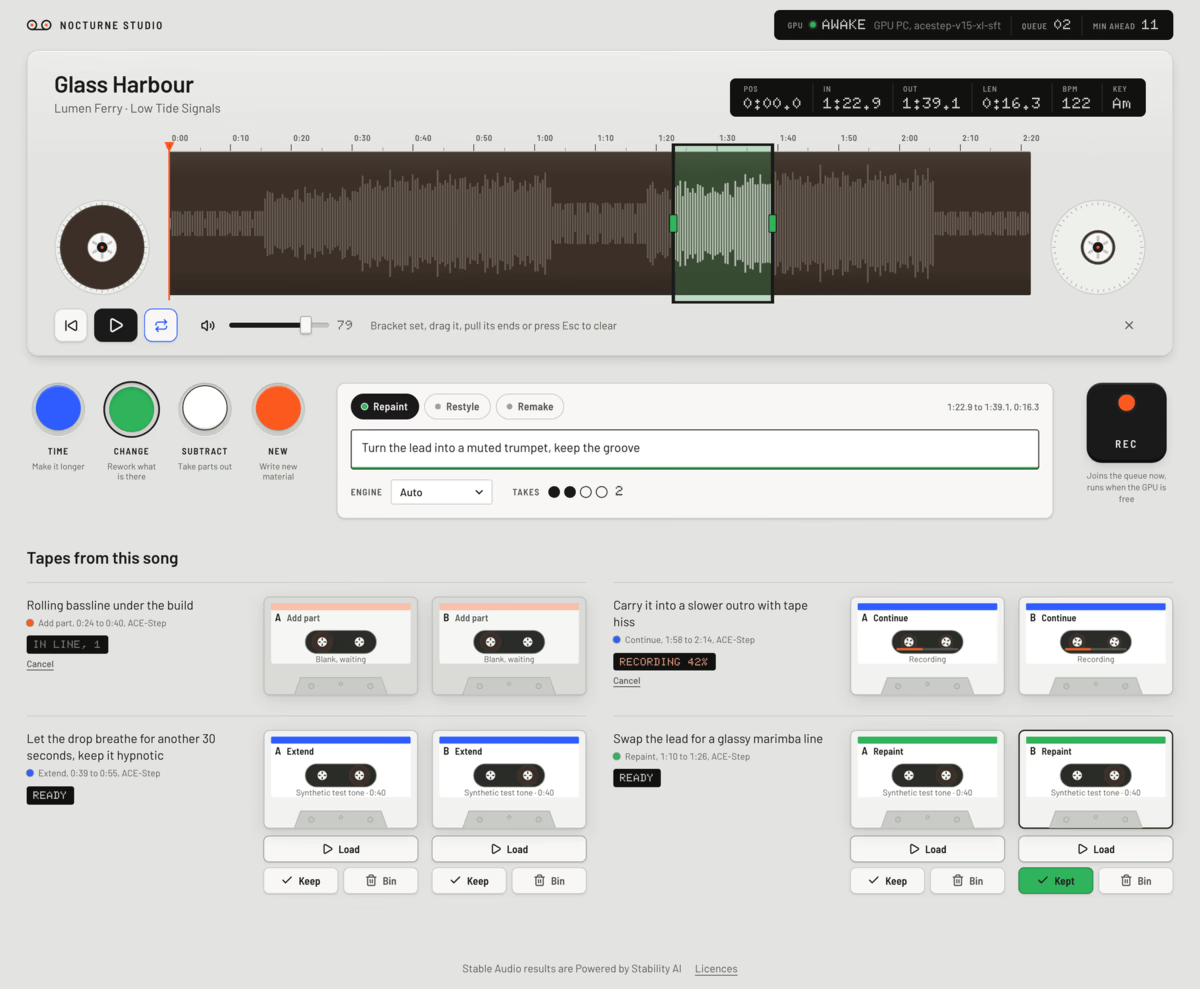
Setting up the hub and the worker is on the install page, and the source is on Forgejo.
Every screenshot uses made-up songs built from synthetic tones, with takes from the repo’s test worker.
The four keys
The core gesture is picking a region on a song’s waveform and pressing one of four colour keys, each a family of actions.
| Key | Actions | What they do |
|---|---|---|
| Time (blue) | Extend, Continue, Loop | make a part longer, carry on from it, or loop it seamlessly |
| Change (green) | Repaint, Restyle, Remake | rework a part, move the whole song to a new style, or build a new song from it |
| Subtract (white) | Vocals off, Stems | strip every voice, or split into vocals, drums, bass and other |
| New (orange) | Generate, Add part | write a new track from a description, or lay a new part such as drums or bass over a region |
Each job comes back as one or more takes on a shelf under the song, which you load into the same deck as the original to compare, then keep or bin.
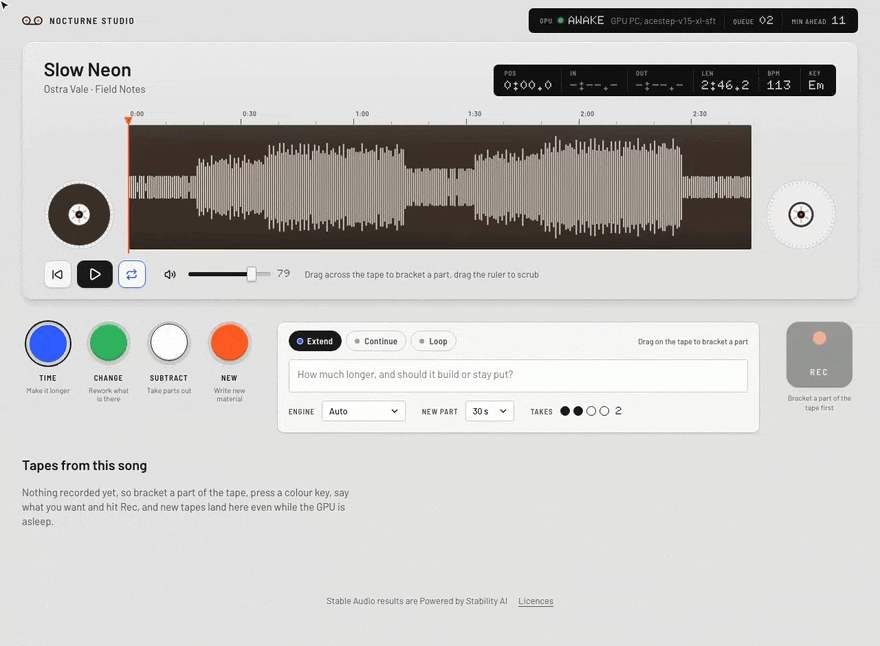
The hub works out each song’s tempo and key when it is imported, and the queue survives the GPU PC being off, rebooting or busy, so jobs run in order whenever the worker comes back.
On a phone
The same deck stacks into one column on a phone, with Rec docked at the bottom of the screen so queuing an idea takes a couple of taps.
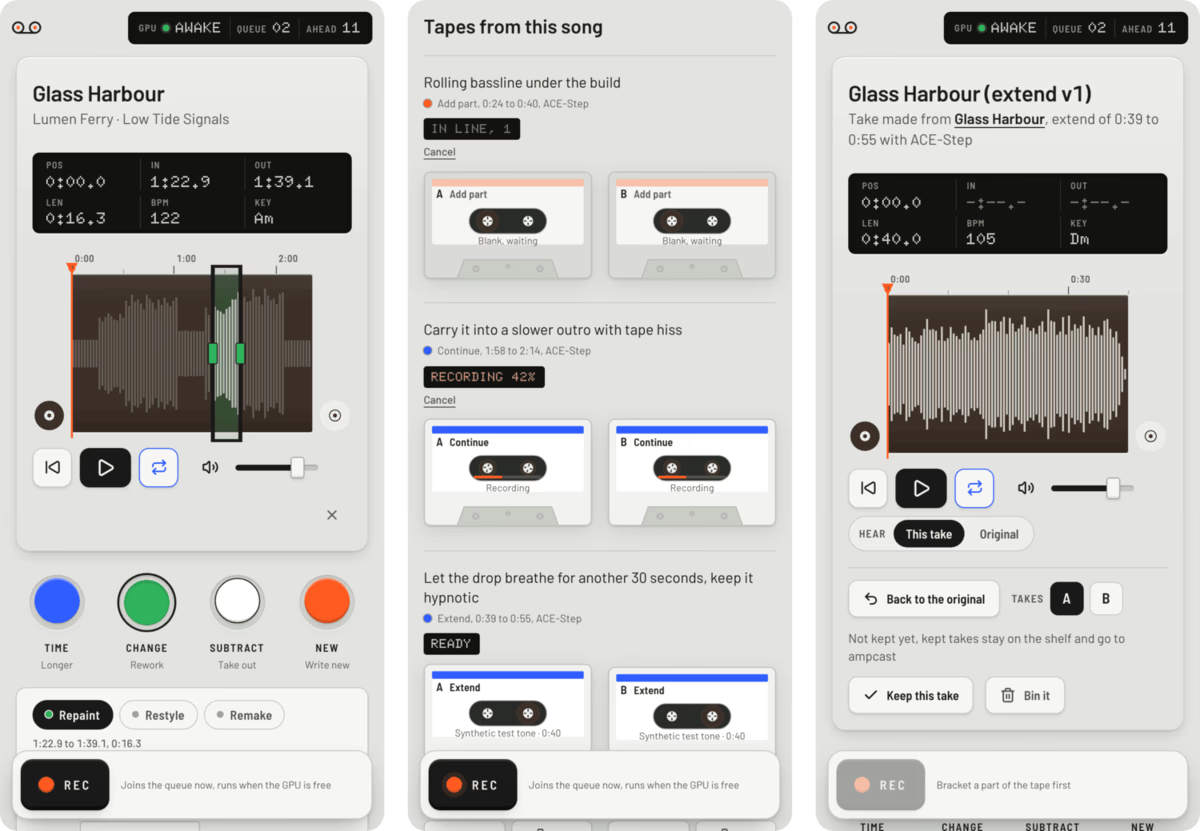
With a Navidrome login the library tab searches your Navidrome library and the home page shows what is playing there, each with a one-tap import, and with NS_EXPORT_DIR set every kept take is also written as a tagged FLAC into a folder you can give Navidrome as a second library.
Engines
| Engine | Used for |
|---|---|
| ACE-Step 1.5 | repaint, extend, continue, restyle, add a part, new songs |
| YuE2-3B on audio.cpp | full songs with vocals, covers |
| Stable Audio 3 Medium on audio.cpp | ambient and electronic instrumentals |
| BS-RoFormer via python-audio-separator, optional | vocal removal, stems |
The hub picks a default engine for each kind of job, which you can override per job, and the worker keeps one heavy model in VRAM at a time.
How it fits together
browser ──▶ hub (FastAPI + Vue, Docker, SQLite queue) ◀── worker on the GPU PC (pulls jobs, outbound only)
The worker only ever calls out to the hub, so the Windows PC opens no ports to the network and its engines listen on loopback only, while a job simply waits as queued until a worker claims it.
| Path | What |
|---|---|
hub/ | FastAPI hub: SQLite queue, library, imports, worker API, serves the built app |
frontend/ | Vue 3 + Vite app |
worker/ | GPU worker: engine manager, ACE-Step, YuE2, Stable Audio 3 and RoFormer adapters |
deploy/ | Docker Compose for the hub, installer and logon task for the Windows worker |
The job contract, the worker protocol and the storage layout are in docs/architecture.md.
Security and privacy
The studio has no logins because it was built for one person on a private network, so keep it behind a VPN or an authenticating reverse proxy and never publish the hub port to the internet.
Your songs, prompts and results stay on your own machines, and the outside calls are YouTube searches and imports through yt-dlp, the browser loading YouTube thumbnails for search results, and the engine and model downloads from Hugging Face, GitHub and PyPI during the worker install, where an engine can also fetch a missing model the first time it runs.
Only import music you have the right to use, and check YouTube’s terms before pulling from it.
Licences
The code is MIT, and parts of the worker and its installer are adapted from inikolax/remiqora under MIT, with every adapted file listed in THIRD_PARTY.md.
The engines and model weights are fetched at install time from their publishers and keep their own licences, several of which limit what you can do with the music you make.
| Component | Licence | What it means |
|---|---|---|
| ACE-Step 1.5 | MIT for the code, the weights carry the terms in the ACE-Step 1.5 repo | free to use |
| audio.cpp | Apache-2.0 | free to use |
| YuE2-3B and its VAE | CC-BY-NC-4.0 | non-commercial only, with credit |
| SheetSage2 (melody extraction for YuE2 covers) | CC-BY-NC-4.0 | non-commercial only, with credit |
| Stable Audio 3 Medium | Stability AI Community License | free for individuals and organisations under US$1M total annual revenue (affiliates included), commercial use needs registering with Stability AI first, above US$1M a paid licence, and “Powered by Stability AI” shown |
| Stable Audio 3’s text encoder (Gemma) | Gemma Terms of Use | use within Google’s prohibited-use policy, and if you share the model or offer it to others as a service, pass on the terms and their use restrictions |
| python-audio-separator | MIT | free to use, its Windows dependency diffq-fixed is CC-BY-NC-4.0 |
| BS-RoFormer Leap Xe and SW checkpoints | none published | not downloaded unless you pass -WithUnlicensedStemModels to the installer, so vocal removal and stems stay off by default |
Stable Audio results are Powered by Stability AI, and the app says so under every page.
Music made with YuE2, or a YuE2 cover that uses SheetSage2, is for non-commercial use, and whatever engine you use, you still need the rights to any song you start from.
The installer saves each model’s licence, or a notice pointing at it, beside the weights.
You need Linux with systemd, Node 22.17 or newer, Git, curl, ip from iproute2, ffmpeg and ffprobe (with libx265, and hevc_vaapi plus access to /dev/dri/renderD128 for GPU encoding), Python 3 with venv, and rclone if you want the archive.
The units start /usr/bin/node, so edit their ExecStart lines if your Node lives elsewhere.
Setup
- Code:
git clone https://git.nocfa.net/NocFA/visitor-book.git ~/visitor-book && cd ~/visitor-book, which the units and commands below assume. - Ring token: run
npx -y -p ring-client-api ring-auth-cli, log in with your Ring account and 2FA code, and save the token it prints withumask 077 && mkdir -p ~/.config && cat > ~/.config/ring-token(paste, then Ctrl-D), and since the token rotates and the recorder rewrites the file each time Ring hands out a new one, never share one token between two Ring clients. - Recorder:
npm ciin the repo root, thenumask 077 && node recorder.mjs --testrecords one clip straight away to check the stream. - Worker: set it up in a venv outside the repo, since YOLO-World drops its CLIP weights into the working directory, with the commands below.
- Web:
cd ~/visitor-book/web && npm ci && RING_TIMEZONE=Europe/London npm run build, then runnode buildwithHOST=127.0.0.1 PORT=3040. - Services:
deploy/systemd/has user units for every piece, so copy them to~/.config/systemd/user/, set your time zone, runsystemctl --user enable --now visitor-book-recorder visitor-book-worker visitor-book-web(plusvisitor-book-archive.timeronce the rclone remote works) andloginctl enable-linger $USERso they run without a login. - Access: the app has no logins, so only reach it through a private VPN (WireGuard, Tailscale) or a reverse proxy that asks for a login before anything else, never a plain HTTPS proxy, then set
RING_PUBLIC_ORIGINto that address when building and checkcurl http://127.0.0.1:3040/api/health.
The worker setup from step 4:
V=~/.local/share/visitor-book/venv && python3 -m venv $V
$V/bin/python -m pip install torch torchvision --index-url https://download.pytorch.org/whl/cpu
$V/bin/python -m pip install ultralytics onnxruntime insightface numpy git+https://github.com/ultralytics/CLIP.git
mkdir -p ~/.local/share/visitor-book/models
curl -fsSLo ~/.local/share/visitor-book/models/yolov8s-worldv2.pt https://github.com/ultralytics/assets/releases/download/v8.3.0/yolov8s-worldv2.pt
cd ~/.local/share/visitor-book && PYTHONPATH=~/visitor-book/worker $V/bin/python -c "import worker; worker.Models()"
The last line downloads CLIP into RING_MODELS and proves the models load, and with RING_FACES=1 set it also fetches InsightFace buffalo_l, so read the face recognition section of the overview first.
Optional extras
These keep their secrets in ~/.config/visitor-book/, so create it private first with install -d -m 700 ~/.config/visitor-book, and write each file below with umask 077 set so only you can read it.
- Phone alerts: put
HA_URL=https://your-home-assistantandHA_TOKEN=<long-lived token>in~/.config/visitor-book/ha.env, pointRING_HA_ENVat it and setRING_HA_NOTIFYto your phone’s notify service in the worker unit, withRING_WEB_URLset to an address your phone can open so the alert links work. - Archive:
RCLONE_CONFIG=~/.config/visitor-book/rclone.conf rclone configcreates a remote namedring-archive(or setRING_ARCHIVE_REMOTE) on any rclone backend, then enablevisitor-book-archive.timer. - Sharing: put
DROP_URL=https://your-drop-serverandDROP_PASSWORD=<owner password>in~/.config/visitor-book/web.env, and build the web app with the sameDROP_URLset (DROP_URL=https://your-drop-server npm run build) so the Share button shows.
Configuration
Runtime settings come from the environment of each service.
| Variable | Used by | Default | What |
|---|---|---|---|
RING_OUT_DIR | all | ~/apps/ring | clips, sidecars and the .index/ database |
RING_TOKEN_FILE | recorder | ~/.config/ring-token | the rotating Ring refresh token |
RING_CLIP_SECONDS, RING_KEEP_DAYS | recorder | 120, 14 | clip length and local retention |
RING_MIN_BATTERY | recorder | 15 | below this battery level only rings record |
RING_VAAPI_DEVICE | recorder | /dev/dri/renderD128 | GPU for the HEVC encode, empty for libx265 only |
RING_FFMPEG | recorder, worker, web | ffmpeg | ffmpeg binary |
RING_FFPROBE | recorder, worker | ffprobe | ffprobe binary |
RING_ICE_INTERFACE | recorder | the default route’s interface | the only interface offered to Ring for WebRTC |
RING_DEVICE_NAME | recorder | visitor-book | the name Ring shows for this client |
RING_CONTROL_PORT, RING_CONTROL_URL | recorder, web | 3041, http://127.0.0.1:3041 | the recorder’s loopback control API |
RING_MODELS | worker | ~/.local/share/visitor-book/models | model weights |
RING_FACES | worker | empty (off) | 1 turns on face recognition |
RING_WORKER_THREADS | worker | 6 | CPU threads for analysis |
RING_FACE_MATCH | worker | 0.42 | ArcFace similarity for the same person |
RING_TIMEZONE or TZ | worker | UTC | day folders and alert times |
RING_HA_NOTIFY | worker | empty (alerts off) | Home Assistant notify service, for example mobile_app_my_phone |
HA_URL, HA_TOKEN or RING_HA_ENV | worker | empty | Home Assistant address and token, or a KEY=value file holding them |
RING_WEB_URL | worker | http://127.0.0.1:3040 | where alert links point |
RCLONE_CONFIG, RING_ARCHIVE_REMOTE | recorder, worker, web | ~/.config/visitor-book/rclone.conf, ring-archive: | the archive remote, off until the config exists |
RING_ARCHIVE_AFTER_DAYS, RING_ARCHIVE_KEEP_DAYS, RING_ARCHIVE_HOLD_DAYS | archive, recorder | 12, 183, 30 | when clips are archived and expired, and how long an unarchived clip is held |
DROP_URL, DROP_PASSWORD | web | empty (sharing off) | a drop server and its owner password for encrypted share links |
The web app also bakes a few names in at build time, read from the environment of npm run build.
| Variable | Default | What |
|---|---|---|
RING_TIMEZONE | UTC | clock times and day labels |
RING_FACES | empty (off) | 1 shows the people index, names and face controls |
RING_PUBLIC_ORIGIN | unset | the HTTPS address the app is served on, for CSRF checks behind a proxy |
RING_SERVER_NAME | this server | named in the copy about where faces are matched |
RING_ARCHIVE_NAME | empty | names the archive in the copy |
DROP_URL | empty | shows the Share button and names the drop server |
Health
GET /api/health on the web app answers ok with a list of problems: the recorder not answering, a worker heartbeat older than 3 minutes, an analysis backlog older than 45 minutes, clips that failed analysis three times, and, with the archive set up, no clean archive run in 36 hours or clips overdue for it.
Visitor Book is a self-hosted visitors’ book for a Ring doorbell, built for doorbells without a Ring Protect plan, where Ring keeps no recordings and the live stream is the only source.
It records a clip on every motion or ring, works out what is in it (people, vehicles, parcels, animals, and optionally who, by face) and files each visit in a web app laid out like a signing-in register, with a player, a people index, a live view, trimming, stills and optional sharing.
Setup, the optional extras and every setting are on the install page, and the source is on Forgejo.
Visitor Book is not affiliated with or endorsed by Ring or Amazon, and talks to Ring through the community ring-client-api library.
What it does
- A register for every day: each motion or ring becomes a numbered entry with a still, the time, who came and what was seen, and a day can be narrowed to one person, to rings of the bell, to visits with a person, parcel, vehicle or animal, or to kept visits.
- A player that shows what happened when: lanes under the scrubber mark people, parcels, vehicles, bicycles and animals, and dragging the playhead lights the matching face and tag, with speed, zoom and pan, stills at full resolution, trims saved as their own visit and a download.
- People, if you turn it on: faces are grouped into people you can name, merge, hide or forget, and a face matched to the wrong person can be moved to the right one, but read the face recognition and privacy sections below first, because the models and the law both set conditions.
- Keep and share: a kept visit is skipped by the 14 day prune, and a clip can go out as an encrypted, expiring link through a drop server.
- Look now: a live view from the page, plus a button that records two minutes on demand, with a warning when the doorbell battery is low.
- Phone alerts and an archive: Home Assistant notifications carry the best frame and a link to the visit, and a nightly job moves older clips to any rclone remote as 480p copies.
The book follows the system’s dark mode with a darker night book, and with recognition turned on, the People page is an index of everyone the book has met, named or not.
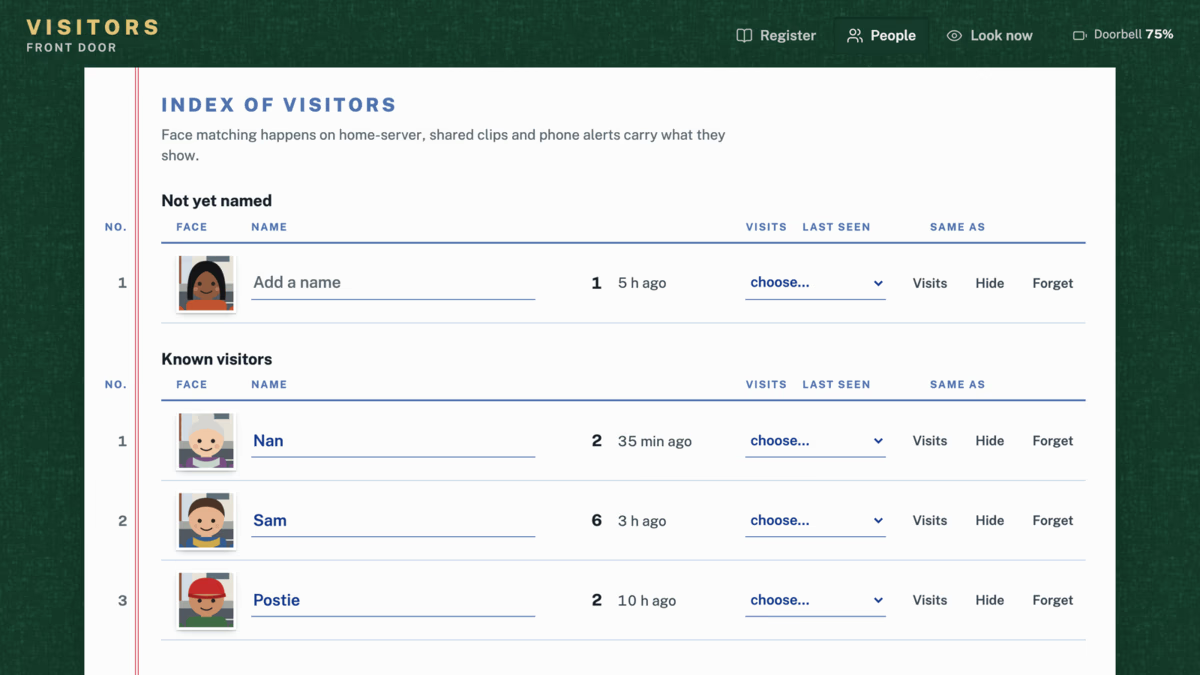
On a phone the register runs as a single column with the tabs along the foot, and an opened visit takes the whole screen.
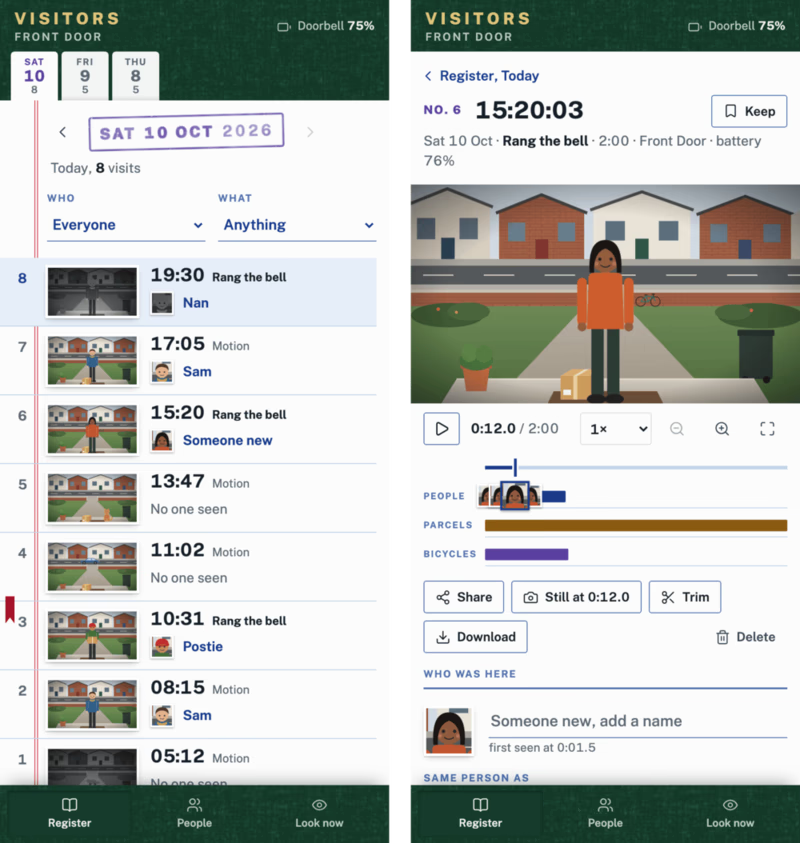
Dragging the playhead lights up each face crop and lane while its visitor or object is in view.
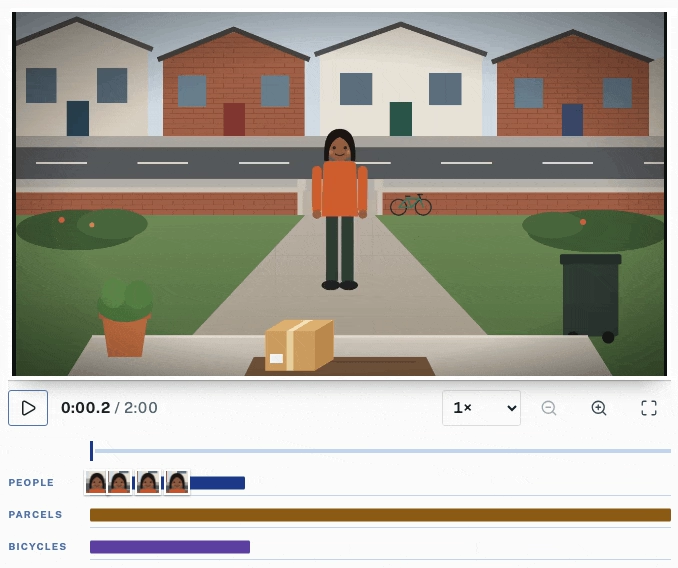
How it fits together
Three services share one data folder, RING_OUT_DIR, with an optional nightly archive beside them.
| Service | Code | Job |
|---|---|---|
| recorder | recorder.mjs (Node, ring-client-api) | Ring push events, 2 minute clips, HEVC encode, 14 day prune, a loopback control API on 127.0.0.1:3041 |
| worker | worker/worker.py (Python) | YOLO-World for people, vehicles, parcels and animals, optional InsightFace face recognition, a SQLite index, optional Home Assistant phone alerts |
| web | web/ (SvelteKit, adapter-node on 127.0.0.1:3040) | the visitors’ book |
| archive (optional, nightly) | worker/archive.py | shrinks older clips to 480p and moves them to any rclone remote, expires them after six months |
Clips land as YYYY-MM-DD/HHMMSS-<camera>-<reason>.mp4 with a .jpg thumbnail and a .json sidecar, the sidecar written last so its presence means the clip is complete.
If both encodes fail the original stream copy is kept, so footage is never lost.
Face recognition
Recognition is off by default, and with RING_FACES=1 in the worker’s environment and in the web build, the worker finds faces with InsightFace, groups them into people and matches later visits against the people you have named.
The buffalo_l models it downloads are licensed by InsightFace for non-commercial research only, which does not cover running them on your own doorbell, so check InsightFace’s licence terms and get permission from them, or leave recognition off.
Names, face images and face data for a person stay until you press Forget on the People page, which removes all of them, while deleting or expiring a visit removes that visit’s faces and an unnamed person goes once none of their visits remain.
Privacy and the law
A doorbell camera records everyone who comes to the door and anyone passing in view, and this app also recognises faces, which many privacy laws (the GDPR among them) treat as biometric data.
- Point the camera at your own property, keep public footpaths and neighbours’ doors out of frame where you can, and put up a sign saying that recording takes place.
- Under the GDPR, recording beyond your own property is not purely household use, so you take on a controller’s duties: a lawful basis under Article 6, retention limits, and honouring access and deletion requests.
- Recognising people by their face is processing biometric data to identify them, which Article 9 forbids unless one of its narrow conditions applies, usually explicit consent from everyone recognised, and that consent is hard to get from passers-by, so check the rules where you live before setting
RING_FACES=1. - Footage, faces and names stay on your own machines, matching happens there, and the services run with
UMask=0077so only your user can read them, while Home Assistant alerts carry a snapshot and drop shares carry the clip you choose, so whoever receives those sees what they show. - Keep the web app private behind a VPN or an authenticating proxy, since it has no logins of its own.
The screenshots come from a demo book with made-up visitors, and the doorstep scenes, the people and their faces are flat illustrations drawn for the demo, so no real footage, faces or names appear in them.
Licence
Visitor Book is under the GNU Affero General Public License v3.0, because the worker uses Ultralytics (AGPL-3.0), and the drop client in web/src/lib/server/drop/ comes from the same author’s drop project and keeps its MIT notice beside it.
Model weights are downloaded at setup time and keep their own terms:
- InsightFace’s pretrained models, including
buffalo_l, are for non-commercial research only, while the InsightFace library itself is MIT. - YOLO-World weights come from Ultralytics under AGPL-3.0, the CLIP code installed from
ultralytics/CLIPis Ultralytics’ AGPL-3.0 fork, and the CLIP model weights it fetches are OpenAI’s, under MIT.
Most other dependencies are under MIT, ISC, BSD or Apache-2.0, with these exceptions:
ffmpeg-for-homebridge, which ring-client-api pulls in, downloads an ffmpeg binary built with GPL and non-free options, fine to run but not to redistribute, so don’t ship it in a package or image.- A few npm packages are under MPL-2.0, which keeps changes to those files under the same licence.
- The Public Sans font is under the SIL Open Font License 1.1.
You need Python 3.10 or newer, ffmpeg with ffprobe, and a current yt-dlp.
For YouTube, yt-dlp also needs a JavaScript runtime such as Deno and its EJS challenge solver, see yt-dlp’s dependencies, and deno --version with yt-dlp --simulate "https://www.youtube.com/watch?v=jNQXAC9IVRw" shows whether both are working.
| System | Media tools |
|---|---|
| macOS | brew install git ffmpeg yt-dlp deno |
| Debian or Ubuntu | sudo apt install git curl ffmpeg pipx, then pipx install "yt-dlp[default,curl-cffi]", pipx ensurepath and Deno from deno.com, then open a new shell |
| Windows | winget install Git.Git Gyan.FFmpeg yt-dlp.yt-dlp DenoLand.Deno, then open a new PowerShell window |
Link the skill
Clone the repo, link skills/watch into your agent’s skills folder and set up local transcription, on macOS or Linux like this:
git clone https://git.nocfa.net/NocFA/watch-video-skill.git ~/src/watch-video-skill
mkdir -p ~/.claude/skills ~/.codex/skills
ln -s ~/src/watch-video-skill/skills/watch ~/.claude/skills/watch
ln -s ~/src/watch-video-skill/skills/watch ~/.codex/skills/watch
python3 ~/src/watch-video-skill/skills/watch/scripts/setup.py --backend local --ocr --detail balanced
On Windows, in PowerShell, where a directory junction needs no admin rights:
git clone https://git.nocfa.net/NocFA/watch-video-skill.git $HOME\src\watch-video-skill
New-Item -ItemType Directory -Force $HOME\.claude\skills, $HOME\.codex\skills | Out-Null
New-Item -ItemType Junction -Path $HOME\.claude\skills\watch -Target $HOME\src\watch-video-skill\skills\watch
New-Item -ItemType Junction -Path $HOME\.codex\skills\watch -Target $HOME\src\watch-video-skill\skills\watch
py -3 $HOME\src\watch-video-skill\skills\watch\scripts\setup.py --backend local --ocr --detail balanced
setup.py installs the transcriber and OCR into managed environments under ~/.cache/watch/, and running it with --json shows what is ready, while leaving out --ocr keeps it to transcripts.
Transcription uses mlx-whisper with Whisper large-v3-turbo on Apple Silicon and WhisperX with the small model on the CPU everywhere else, Intel Macs included, while OCR uses Apple Vision on every Mac and RapidOCR on Linux and Windows.
--detail sets how many frames a normal request uses (efficient, balanced, token-burner or transcript), and you can change it and everything else later in ~/.config/watch/.env.
Then ask your agent something like watch https://youtu.be/... and tell me which settings they changed.
Settings
~/.config/watch/.env holds the defaults, and the main ones are WATCH_DETAIL for how many frames, WATCH_SHEETS, WATCH_MAX_HEIGHT for the download resolution and WATCH_WHISPER_BACKEND, with every setting and its default listed in skills/watch/scripts/config.py.
For a faster or better WhisperX transcript, set WATCH_WHISPERX_MODEL=large-v3-turbo, and on an NVIDIA GPU also WATCH_WHISPERX_DEVICE=cuda and WATCH_WHISPERX_COMPUTE_TYPE=float16, then rerun setup.py --install-whisperx, which rebuilds its environment with the CUDA build of PyTorch.
Groq and OpenAI transcription are there for machines that can’t run Whisper, by setting WATCH_WHISPER_BACKEND=groq (or openai) and putting the key on the GROQ_API_KEY= (or OPENAI_API_KEY=) line of ~/.config/watch/.env in your own editor, since the skill never asks for a key in chat.
Develop
cd ~/src/watch-video-skill
python3 -m venv .venv && .venv/bin/pip install pytest
.venv/bin/python -m pytest -q
bash skills/watch/scripts/build-skill.sh   # dist/watch.skill for claude.ai uploads
The tests need ffmpeg built with libx264.
The bundle script packs the committed tree, so it needs a clean checkout plus Git, Bash, unzip and cmp, and on Windows it runs from Git Bash.
watch is an Agent Skill that lets Claude Code, Codex or any agent that reads SKILL.md files watch a video.
Give it a URL or a local file and it downloads the video with yt-dlp, picks frames at scene cuts and at regular intervals, reads the on-screen text with OCR and takes the transcript from captions or a local Whisper model, and the agent then answers from timestamped contact sheets, the extracted text and the transcript.
It is a heavily extended fork of bradautomates/claude-video, based on the upstream commit recorded in UPSTREAM_COMMIT, and the source is on Forgejo.
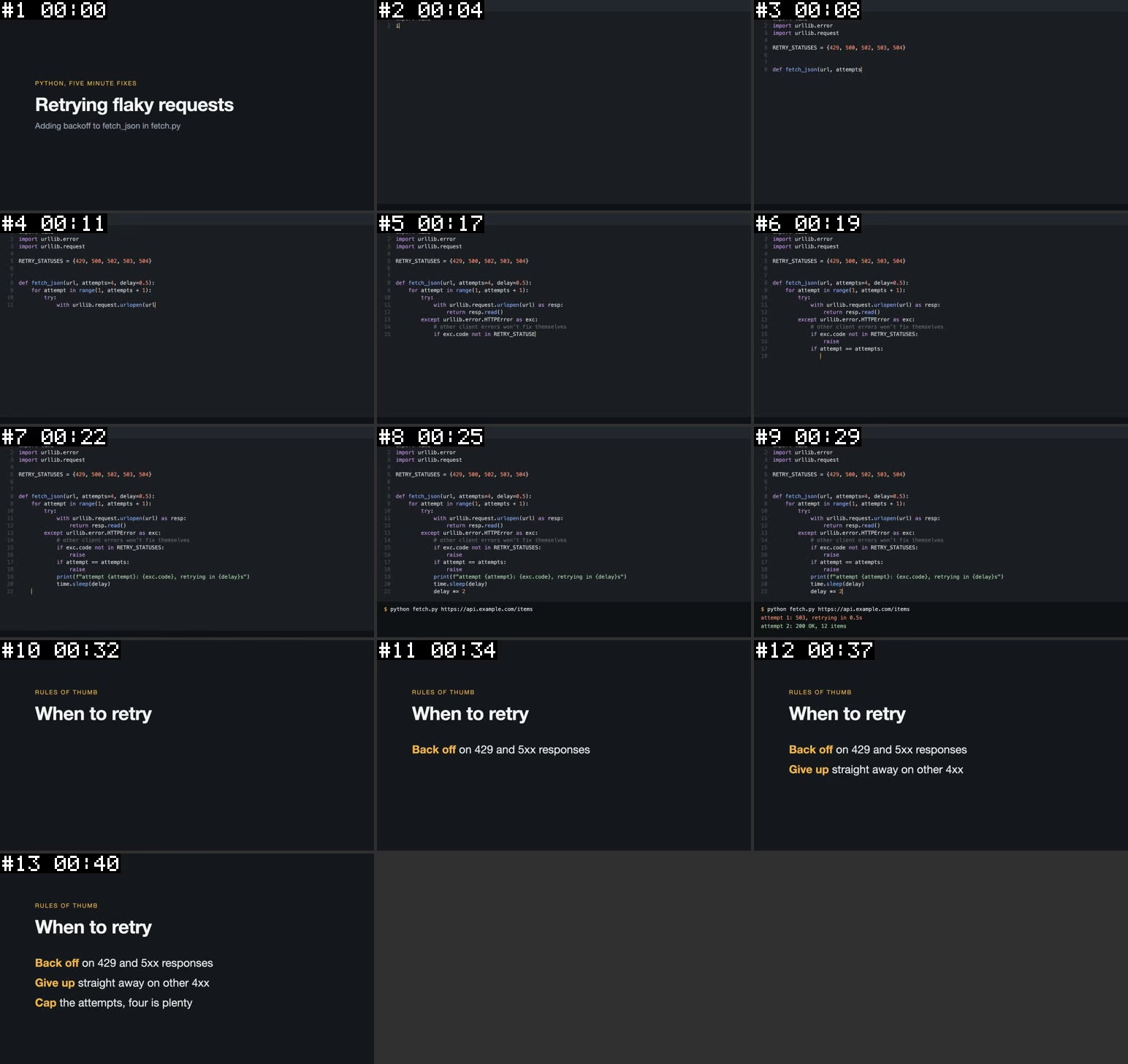
That sheet comes from a real run on a 44-second synthetic screencast, where 13 frames were kept out of 40 candidates and typing that never cuts to a new scene still got a frame every few seconds.
Setup for macOS, Linux and Windows is on the install page.
What the agent gets
Each run prints a Markdown report with the question on top, the contact sheets to view, the on-screen text frame by frame and the transcript, and this is part of the report from the run above, with the frame list and most of the text blocks cut for length:
# watch: video report

- **Question:** Which status codes are retried?
- **Duration:** 00:44 (44.0s)
- **Resolution:** 1920x1080 (h264)
- **Detail:** balanced
- **Frames:** 13 selected from 40 candidates (scene, 27 near-duplicates dropped, full range, budget 40, cap 100)
- **On-screen text:** read by Apple Vision from full-resolution stills, new text on 13 of 13 frames
- **Transcript:** 5 segments (via whisper (mlx whisper-large-v3-turbo, language en, auto-detected))

## On-screen text

**#3 00:08**
```
import urllib.error
import urllib. request
RETRY_STATUSES = {429, 500, 502, 503, 504}
def fetch_json(url, attempts)
```

**#9 00:29**
```
attempt 1: 503, retrying in 0.5s
attempt 2: 200 OK, 12 items
```

## Transcript

```
[00:00] Today we're adding retries to a flaky fetch helper.
[00:04] The loop tries up to 4 times, on a 429, or any 500 error, it backs off, doubling the delay from half a second.
[00:14] Other client errors fail straight away, since retrying won't fix them.
[00:24] Running it, the first attempt gets a 503, and the second one succeeds
[00:31] So, 3 rules, back off on 429 and 500s, give up on other 400s, and cap the attempts
```
The agent reads the exact status codes from frame 3 and hears the half-second backoff in the transcript, and it views the sheet itself whenever the question is about what is shown.
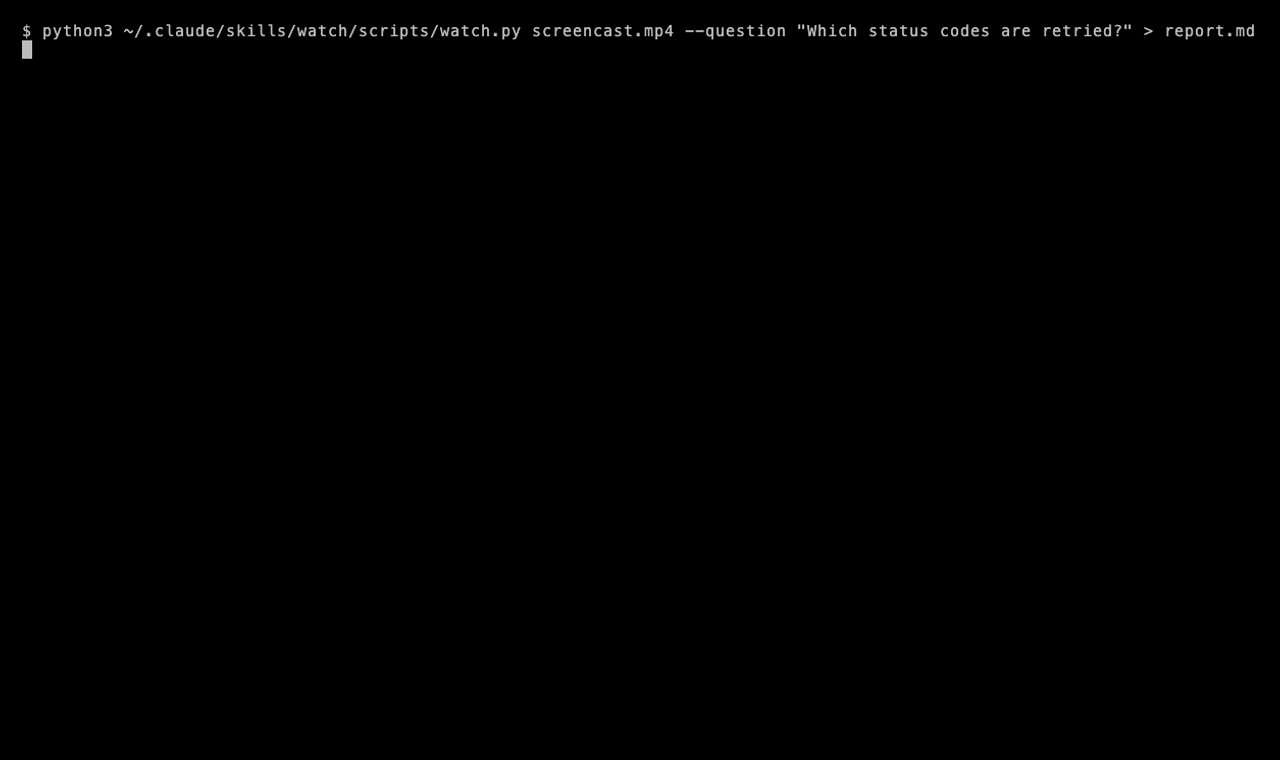
The same run took about 12 seconds in a terminal on an M1 Pro, and agents call the script the same way and read the report from its output.
How it fits together
skills/watch/scripts/watch.py runs every stage and prints the report, keeping everything in a disposable work dir whose path closes the report.
For a URL, yt-dlp checks for captions first and then fetches the media, ffmpeg picks the frames in frames.py, transcription runs in a background thread while ocr.py reads the full-resolution stills, and sheets.py tiles the kept frames into contact sheets.
What the fork adds
- Frame selection. The balanced and token-burner details take every scene cut plus the first frame of each interval in the same ffmpeg pass, so typing in an editor or a slide that builds up without a hard cut still gets frames.
- Region-aware dedup. A frame only counts as a duplicate when the whole frame barely changed and no 8×8 region of its thumbnail did, so one typed line of code keeps its frame while held slides collapse.
- On-screen text. A full-resolution still is read at each selected frame by Apple Vision or RapidOCR, and the report lists only text that is new since the two previous frames, joins table rows and rebuilds code indentation.
- Local transcription. mlx-whisper large-v3-turbo on Apple Silicon runs about 20 times realtime on an M1 Pro, WhisperX runs elsewhere, and transcription runs in parallel with OCR.
- Contact sheets. Selected frames are tiled into grids inside a 1568px box, each cell stamped
#N MM:SS, so one image view covers many frames. - Smaller reports. YouTube’s rolling auto-captions are unrolled into 160-character chunks, which cut a 17-minute transcript from 58 KB to 18 KB, and downloads default to 1080p so OCR can read code.
- Unattended runs. With nobody to answer setup questions, the skill reports what is missing and carries on with what it has.
On an M1 Pro a 2:23 screencast takes about 21 seconds, and a 17-minute video with captions takes 56 seconds with a 35 KB report.
Where your data goes
Downloading, frame picking, OCR and local transcription all run on your machine, and the contact sheets, on-screen text and transcript then go into your agent’s context like any other file it reads, so if your agent runs on a hosted model that provider sees them.
Audio only leaves your machine when you choose Groq or OpenAI as the transcription backend yourself, since the default auto uses captions or a local model and never a cloud one.
Licence
watch is MIT, covering both the upstream project and this fork’s changes, and skills/watch/LICENSE carries the same notice so copies of the skill folder and the .skill bundle keep it.
The skill installs or calls these tools, which keep their own licences:
| Component | Licence |
|---|---|
| yt-dlp | Unlicense, though the standalone executables bundle GPLv3+ parts |
| FFmpeg | LGPL-2.1+ or GPL-2.0+, depending on how your build was configured |
| WhisperX | BSD-2-Clause |
| mlx-whisper and PyTorch | MIT and BSD-3-Clause |
| RapidOCR and its PaddleOCR models | Apache-2.0 |
| Whisper model weights | MIT |
The default mlx model, mlx-community/whisper-large-v3-turbo, is a community conversion of OpenAI’s MIT-licensed weights whose model card states no licence of its own, and WATCH_MLX_MODEL points at another conversion if you prefer one.
The repo only ships the skill’s own scripts while the tools and weights are fetched from their publishers, so if you bundle any of them into something you hand to others, their licence notices and source obligations come with them.
Only download videos you are allowed to, and respect each site’s terms.
Builds for Windows, macOS and Linux land on the latest release whenever a tag is pushed, built on the Forgejo runners.
Download
| Platform | File | Notes |
|---|---|---|
| Windows x64 | T3-Nocturne-windows-x64.exe | Unsigned, so SmartScreen wants More info then Run anyway |
| macOS Apple Silicon | T3-Nocturne-macos-arm64.dmg | Unsigned, see below |
| Linux x64 | T3-Nocturne-linux-x64.AppImage | chmod +x it and run |
macOS calls the app damaged because it isn’t notarised, which is harmless. After dragging it to Applications, clear the quarantine flag:
xattr -dr com.apple.quarantine /Applications/T3-Nocturne.app
T3-Nocturne installs next to T3 Code with its own icon and its own data in ~/.t3-nocturne. It doesn’t update itself, so grab a new build from the release page when you want one.
Hooking up Segments
Run the Segments daemon (sg) on the machine that runs T3, and T3-Nocturne finds it at http://127.0.0.1:7765. For a daemon somewhere else, set segmentsUrl in ~/.t3-nocturne/userdata/settings.json:
{ "segmentsUrl": "http://my-box.tailnet:7765" }
Each T3 server talks to its own daemon and the browser never touches it. Without a daemon the Tasks panel doesn’t appear and nothing else changes.
Build it yourself
You need Vite+ (vp), Node 24 and Rust.
git clone https://git.nocfa.net/NocFA/t3-nocturne.git
cd t3-nocturne
vp i
vp run dev
For a desktop installer on your platform:
node scripts/build-desktop-artifact.ts --platform win --target nsis --arch x64 \
  --build-version 0.0.42-preview.20260924.1
Swap in mac / dmg / arm64 or linux / AppImage / x64 for the others. Keep -preview. in the version, because that is what switches the update feed off.
T3-Nocturne is my build of T3 Code, the desktop GUI for Codex, Claude, Cursor, OpenCode and other coding agents. It tracks the T3 Code stable channel and adds a Tasks panel backed by Segments, so tasks keep their priority, blockers and brief after the agent session that made them has ended.
Downloads, Segments setup and build steps are on the install page. The source is on Forgejo.
The map
Open Tasks from the chat header or the command palette, and every task in the project appears as a star.
- Colour is priority, P0 through P3, and bigger, brighter stars are due sooner.
- Work you can start right now sits near the core, while chains of blocked work pull together into clusters.
- Finished work drifts to the rim and stays hidden until you ask for it.
Drag to orbit, right-drag to pan and scroll toward anything to fly in. The layout rules and frame rate hold from twelve tasks to thirty thousand, and big projects settle into a spiral galaxy on their own. Clicking a star flies the camera there and opens the task beside it, with the full brief and whatever it is waiting on.
| Key | Does |
|---|---|
F | Focus on what’s live |
A | Show everything |
/ | Search |
The black hole
Out past the rim sits a ray-traced Schwarzschild black hole with a Keplerian disk that actually spins. Click it to visit, then orbit with the galaxy behind it and the light bends into an Einstein ring that slides around the hole as you move.
Motion costs some GPU, so the Key panel has a quality slider running Still, Low, Medium and High. On Still nothing moves until you touch it.
The list
Small projects get a sky with only a handful of stars, and List shows the same tasks grouped and ranked instead. Each row opens the full brief.
Implement
Pick a task and hit Implement to open a new thread with the task body as the brief. The usual provider, model, branch and worktree pickers all apply, and once you send it the task flips to in progress on its own. Send to chat does the same into the thread you already have open.
Credit
T3 Code is by Theo, Julius and the T3 Tools crew, and the hard parts are theirs. T3-Nocturne is MIT licensed, the same as upstream.
A foobar2000 component that renders animated GIF files as album art. Drop it in, point the artwork panel at a .gif, and your covers come alive — with transparency, smooth scaling, and graceful fallbacks when there’s no GIF to be found.
Features
- Animated GIF playback in the Album Art Viewer
- Static images too: JPG, PNG, WEBP, BMP
- Embedded album art fallback when no external file matches
- Transparency and smooth scaling
Install & use
Grab the pre-built .fb2k-component from the releases page and drag it into foobar2000 (or copy the .dll into components/), then add Album Art Viewer to your layout from UI elements.
Name your art files so the component finds them, next to the music:
Requires foobar2000 2.1+ (x64) on Windows 10 or newer.
Building
C++ against the foobar2000 SDK (2025-03-07+) with WTL 10, built with Visual Studio 2022 / MSBuild — the README walks through the SDK layout and the wtl.props path setup. MIT-licensed.
One header, one config struct, one lookup call.
#include <gindexer/gindexer.h>

gindexer::config cfg;
cfg.dirs = {"/home/user/music"};
cfg.splitter = split;            // your artist-splitting logic

gindexer::indexer idx(std::move(cfg));

auto result = idx.lookup("Radiohead", "Creep", "Pablo Honey");
if (result) {
    // result->cover    — path to the cover art (or the audio file itself
    //                    when the art is embedded; check result->embedded)
    // result->artist / title / album — the matched track's tags
}
A miss means the track isn’t in the index — the watcher keeps things current, so “not indexed yet” isn’t a state you see.
Config
External cover art must sit in the same directory as the audio file it belongs to.
Building
CMake 3.27+ and a C++17 compiler. Dependencies — TagLib, efsw, LMDB, lmdbxx, Catch2 — are fetched automatically via FetchContent:
cmake -B build
cmake --build build
ctest --test-dir build --output-on-failure   # with -DBUILD_TESTING=ON
A C++ library that indexes a local music collection and resolves cover art by track metadata. Written for discord-music-presence, where lookups need to be fast enough not to be noticeable: give it an artist / title / album query, get back the path to the matching cover art. If nothing matches, you get nothing back. That’s the whole thing.
How it works
Tags are read via TagLib — ID3 is the source of truth, not filenames or folder structure. The index lives in memory by default; set db_path to persist it via LMDB, which makes warm starts near-instant (the constructor returns in a few milliseconds and a background thread reconciles anything that changed while the app wasn’t running). A file watcher (efsw) keeps the index current while running.
Lookups use bigram similarity (Sørensen–Dice) so minor tag inconsistencies between what the OS reports and what’s in the file don’t cause misses. A composite score — title 50%, artist 35%, album 15% — is compared against a configurable threshold; set exact = true for strict matching instead.
Cover art resolves two ways: external files matched by case-insensitive regex (default cover\.gif), or embedded pictures read from the audio tags when embedded is on.
Performance
Benchmarked on a 4,470-track library (Windows 11, SSD), external-art mode:
Supported formats: mp3, flac, ogg, opus, m4a, aac, wav, aiff, wv, ape, mpc, wma — anything TagLib can read tags from.
Integration details live in the API page.
Segments ships as a single binary named sg. The install scripts download a pre-built binary for your platform and fall back to building from source when none is available.
macOS / Linux
curl -fsSL https://git.nocfa.net/NocFA/segments/raw/branch/main/scripts/install.sh | bash
Windows
powershell -ExecutionPolicy Bypass -Command "irm https://git.nocfa.net/NocFA/segments/raw/branch/main/scripts/install.ps1 | iex"
Installs to %USERPROFILE%\.local\bin and adds it to the user PATH. If a source build is needed, the script auto-installs Go and MinGW-w64 via winget.
From source
git clone https://git.nocfa.net/NocFA/segments.git
cd segments
make install
Quick start
sg setup    # configure integrations (Pi, Claude Code, OpenCode)
sg start    # start the server
Then open http://localhost:8765 for the web UI, and sg init inside a project directory to start tracking it. sg setup is the required first step — it wires the MCP server and editor integrations.
Segments speaks MCP so coding agents can plan against the same task state you see in the CLI and web UI. sg setup wires the integrations: Claude Code, OpenCode, and a Pi extension embedded in the binary for task-aware AI sessions.
Scoping
Every tool call auto-resolves the current project from the agent’s working directory — an MCP call from inside a repo is about that repo’s tasks unless the agent explicitly asks otherwise (all_projects=true, or --all on the CLI). Task IDs are globally addressable: a full UUID or unique prefix resolves across all projects.
Tools
Session integration
A SessionStart hook prints an orientation banner — in-progress claims, recently closed tasks — so an agent starts each session knowing the state of play. Agents claim work by setting a task in-progress, which every other session and the web UI see live. A stdio shim lets multiple MCP clients share one server instance.
Changes made by agents surface in the web UI over WebSocket as they happen, which makes it easy to watch an agent burn through a queue.
A performant, lightweight, single-binary task and project manager, written in Go. Built as a faster, leaner alternative to Beads: same job, LMDB under the hood, no Dolt, no fuss. One binary carries the CLI, a live web UI, and an MCP server for AI coding agents.
Synopsis
sg <command> [flags]
Why
Beads is slow, heavy, and leans on a Dolt DB infrastructure that is miserable to live with. Segments keeps the idea — projects, tasks, priorities, dependency chains — and drops the weight. It is especially nice for solo power users, but nothing stops you from reverse-proxying the dashboard for a team, or orchestrating downstream actions off its state.
Surfaces
Features
- Projects and tasks with priorities, statuses, dependency chains, and rich-text bodies
- Three interchangeable web themes (Obsidian, Console, Dossier), each with light and dark modes
- Three views: grouped List, drag-and-drop Kanban, and a top-down dependency Graph
- Real-time updates over WebSocket — edits from another tab, the CLI, or an MCP agent show up live
- Command palette and full keyboard-first navigation
sg nextto pick the best unblocked task,sg statsfor a progress dashboard,sg exportfor JSONL snapshots- Beads import for migrating an existing backlog
Status
Work in progress, but stable enough for daily use. Release series so far: 0.1 foundation (LMDB storage, core CLI, first MCP integrations, basic web UI), 0.2 TUI ergonomics and Windows support, 0.3 the three-theme GUI with Graph/Kanban/List views, 0.4 (current) MCP and session polish — globally addressable task IDs, SessionStart hooks, a stdio shim for multi-client MCP. 0.5 targets optimisation, 0.6 GUI polish.
Start with install.
sg start serves a live dashboard at http://localhost:8765. Pick a theme from the dropdown in the top bar — each supports light and dark modes.
Views
Real-time
Every tab connects over WebSocket and receives live deltas for task and project changes, whether those come from another tab, the CLI, or an MCP agent. New tasks slide in; edits pulse briefly.
Keyboard
Ctrl+K / Cmd+K opens a command palette that fuzzy-jumps between projects, views, and tasks. Beyond that:
An aggregated All tasks scope spans every project, plus a ready-queue filter for tasks with no outstanding blockers.
Static analysis cannot prove runtime shell behavior, and shellwhy refuses to pretend otherwise. Every startup file in a report carries one of six labels:
Static mode
The default. It identifies the target shell from --shell, $SHELL, or parent-process metadata; infers login / interactive / SSH / terminal context from flags, argv, TTY state, and environment; applies the startup rules for that shell and mode; checks which files exist; and shows files skipped by precedence — bash reading only the first existing ~/.bash_profile, ~/.bash_login, or ~/.profile is the classic case. Simple source statements are parsed without evaluating shell code.
What it cannot do: prove conditional branches, dynamic paths, plugin-manager side effects, aliases, functions, exports, or PATH changes created at runtime. Those stay possible at best.
Trace mode
shellwhy trace launches a fresh target shell and observes file access through a platform backend — currently strace on Linux, with dtruss/fs_usage planned for macOS. Observed files are merged into the report as confirmed. The trade-off: trace mode runs the user’s startup code, because it starts a real shell. Use static mode when analysis must be non-invasive.
shellwhy answers a practical dotfiles question: “why is my shell doing this?” It inspects the current or requested shell mode, applies startup-file rules, safely parses obvious source statements, detects common shell tooling hooks, and reports what is inferred, possible, missing, skipped, or observed. Written in Rust; MIT/Apache-2.0 dual-licensed.
There was no standardised way to check how a shell is configured and which files are affecting the running process — this is that tool.
Features
- Static startup-file rules for
bash,zsh, andfish, with conservative fallbacks forsh/dash,ksh/mksh,tcsh/csh, andnu - Safe static parsing for obvious
source fileand. filestatements — no shell code is executed - Detection for common tooling hooks:
starship,oh-my-zsh,zinit,direnv,asdf,pyenv,nvm,fnm,fisher,tide - Human-readable, plain, and JSON output
- Linux trace mode using
straceto observe what actually loads
Usage
shellwhy                                   # infer and explain the current shell
shellwhy --shell bash                      # explain bash startup for this user
shellwhy --shell zsh --login --interactive # a specific mode
shellwhy --shell bash --json               # machine-readable
shellwhy trace --shell fish                # observe via strace (Linux)
shellwhy explain                           # why shell-startup certainty is hard
Install
cargo install --path . # from a checkout
Every reported file carries a confidence label rather than a pretence of certainty — the confidence model is the core design idea.
The full command surface of sg. Aliases are shown in parentheses.
Server
Tasks
Setup
Maintenance
Info
How these compose day to day is covered in workflow.
The daily loop Segments is built around: capture everything, then always know what to pick up next.
sg init          # once, in the project directory
sg add           # capture work as it appears
sg next          # what should I do now?
sg done <id>     # ship it
The ready queue
A task is ready when it is a todo with no outstanding blockers. sg next ranks the ready queue — highest priority first, oldest wins ties — and prints the best pick followed by the rest. Dependency chains (task B blocked by task A) keep downstream work out of the queue until its blockers land.
Priorities
Projects
sg list scopes to the project matching the working-directory name, so a plain sg list inside a repo shows that repo’s tasks. The web UI’s All tasks scope aggregates across every project when you want the portfolio view.
Snapshots and migration
sg export streams task state as JSONL — one event per line — suitable for git-tracked snapshots or downstream pipelines. Configure a path in config.yaml to have every CLI / MCP mutation append automatically. Coming from Beads, sg beads imports an existing backlog wholesale.